

Vue3 快速上手
Vue3 简介
- 2020 年 9 月 18 日,
Vue.js发布版3.0版本,代号:One Piece(n - 经历了:4800+次提交、40+个 RFC、600+次 PR、300+贡献者
- 官方发版地址:Release v3.0.0 One Piece · vuejs/core
- 截止 2023 年 10 月,最新的公开版本为:
3.3.4
性能的提升
-
打包大小减少
41%。 -
初次渲染快
55%, 更新渲染快133%。 -
内存减少
54%。
新的特性
Composition API(组合API):
-
setup -
ref与reactive -
computed与watch…
创建 Vue3 工程
基于 vue-cli 创建
点击查看官方文档
备注:目前
vue-cli已处于维护模式,官方推荐基于Vite创建项目。
## 查看@vue/cli版本,确保@vue/cli版本在4.5.0以上vue --version
## 安装或者升级你的@vue/clinpm install -g @vue/cli
## 执行创建命令vue create vue_test
## 随后选择3.x## Choose a version of Vue.js that you want to start the project with (Use arrow keys)## > 3.x## 2.x
## 启动cd vue_testnpm run serve基于 vite 创建
vite 是新一代前端构建工具,官网地址:https://vitejs.cn,vite的优势如下:
- 轻量快速的热重载(
HMR),能实现极速的服务启动。 - 对
TypeScript、JSX、CSS等支持开箱即用。 - 真正的按需编译,不再等待整个应用编译完成。
具体操作如下(点击查看官方文档)
## 1.创建命令npm create vue@latest
## 2.具体配置## 配置项目名称√ Project name: vue3_test## 是否添加TypeScript支持√ Add TypeScript? Yes## 是否添加JSX支持√ Add JSX Support? No## 是否添加路由环境√ Add Vue Router for Single Page Application development? No## 是否添加pinia环境√ Add Pinia for state management? No## 是否添加单元测试√ Add Vitest for Unit Testing? No## 是否添加端到端测试方案√ Add an End-to-End Testing Solution? » No## 是否添加ESLint语法检查√ Add ESLint for code quality? Yes## 是否添加Prettiert代码格式化√ Add Prettier for code formatting? No自己动手编写一个 App 组件
<template> <div class="app"> <h1>你好啊!</h1> </div></template>
<script lang="ts">export default { name: "App", //组件名};</script>
<style>.app { background-color: #ddd; box-shadow: 0 0 10px; border-radius: 10px; padding: 20px;}</style>总结:
Vite项目中,index.html是项目的入口文件,在项目最外层。- 加载
index.html后,Vite解析<script type="module" src="xxx">指向的JavaScript。 Vue3中是通过createApp函数创建一个应用实例。
Vue3 核心语法
OptionsAPI 与 CompositionAPI
Vue2的API设计是Options(配置)风格的。选项式Vue3的API设计是Composition(组合)风格的。组合式
Options API 的弊端
Options类型的 API,数据、方法、计算属性等,是分散在:data、methods、computed中的,若想新增或者修改一个需求,就需要分别修改:data、methods、computed,不便于维护和复用。
Composition API 的优势
可以用函数的方式,更加优雅的组织代码,让相关功能的代码更加有序的组织在一起。
setup 概述
setup是Vue3中一个新的配置项,值是一个函数,它是 Composition API “表演的舞台”,组件中所用到的:数据、方法、计算属性、监视…等等,均配置在setup中。
特点如下:
setup函数返回的对象中的内容,可直接在模板中使用。setup中访问this是undefined。setup函数会在beforeCreate之前调用,它是“领先”所有钩子执行的。
setup 的返回值
- 若返回一个对象:则对象中的:属性、方法等,在模板中均可以直接使用**(重点关注)。**
- 若返回一个函数:则可以自定义渲染内容,代码如下:
setup(){ return ()=> '你好啊!' }setup 与 Options API 的关系
Vue2的配置(data、methos…)中可以访问到setup中的属性、方法。- 但在
setup中不能访问到Vue2的配置(data、methos…)。 - 如果与
Vue2冲突,则setup优先。setup 可以与 data、methods 共存但不推荐
setup 语法糖
setup函数有一个语法糖,这个语法糖,可以让我们把setup独立出去,代码如下:
<template> <div class="person"> <h2>姓名:{{ name }}</h2> <h2>年龄:{{ age }}</h2> <button @click="changeName">修改名字</button> <button @click="changeAge">年龄+1</button> <button @click="showTel">点我查看联系方式</button> </div></template>
<!-- 下面的写法是setup语法糖 --><script setup lang="ts" name="Person">// 数据,原来写在data中(注意:此时的name、age、tel数据都不是响应式数据)let name = "张三";let age = 18;let tel = "13888888888";
// 方法,原来写在methods中function changeName() { name = "zhang-san"; //注意:此时这么修改name页面是不变化的 console.log(name);}function changeAge() { age += 1; //注意:此时这么修改age页面是不变化的 console.log(age);}function showTel() { alert(tel);}</script>指定组件名字
扩展:上述代码,还需要编写一个不写setup的script标签,去指定组件名字,比较麻烦,我们可以借助vite中的插件简化
- 第一步:
npm i vite-plugin-vue-setup-extend -D - 第二步:
vite.config.ts
import { defineConfig } from "vite";import VueSetupExtend from "vite-plugin-vue-setup-extend";
export default defineConfig({ plugins: [VueSetupExtend()],});在 Vue 3.3+ 中引入了 defineOptions,它可以让我们在 <script setup> 中直接定义这些组件选项,而不需要切换回传统的 export default 语法。
defineOptions 的作用是集中管理组件的元信息和配置选项。以下是一些常见的用途:
- 定义组件名称 (name):用于调试工具(如 Vue DevTools)或递归组件。
- 控制属性继承 (inheritAttrs):决定是否将父组件传递的非 prop 属性自动绑定到根元素。
- 自定义选项 :可以定义任意自定义的组件选项。
- 其他高级配置 :如 customElement 配置等。
<template> <div> <h1>这是一个组件</h1> <p>{{ message }}</p> </div></template>
<script setup>import { ref } from "vue";
// 使用 defineOptions 定义组件选项defineOptions({ name: "MyComponent", // 组件名称 inheritAttrs: false, // 禁用属性继承 customOption: "This is a custom option", // 自定义选项});
const message = ref("Hello, Vue 3!");</script>ref 创建:基本类型的响应式数据
- 作用:定义响应式变量。
- 语法:
let xxx = ref(初始值)。 - 返回值:一个
RefImpl的实例对象,简称ref对象或ref,ref对象的value属性是响应式的。 - 注意点:
JS中操作数据需要:xxx.value,但模板中不需要.value,直接使用即可。- 对于
let name = ref('张三')来说,name不是响应式的,name.value是响应式的。
<template> <div class="person"> <h2>姓名:{{ name }}</h2> <h2>年龄:{{ age }}</h2> <button @click="changeName">修改名字</button> <button @click="changeAge">年龄+1</button> <button @click="showTel">点我查看联系方式</button> </div></template>
<script setup lang="ts" name="Person">import { ref } from "vue";// name和age是一个RefImpl的实例对象,简称ref对象,它们的value属性是响应式的。let name = ref("张三");let age = ref(18);// tel就是一个普通的字符串,不是响应式的let tel = "13888888888";
function changeName() { // JS中操作ref对象时候需要.value name.value = "李四"; console.log(name.value);
// 注意:name不是响应式的,name.value是响应式的,所以如下代码并不会引起页面的更新。 // name = ref('zhang-san')}function changeAge() { // JS中操作ref对象时候需要.value age.value += 1; console.log(age.value);}function showTel() { alert(tel);}</script>reactive 创建:对象类型的响应式数据
- 作用:定义一个响应式对象(基本类型不要用它,要用
ref,否则报错) - 语法:
let 响应式对象= reactive(源对象)。 - 返回值:一个
Proxy的实例对象,简称:响应式对象。 - 注意点:
reactive定义的响应式数据是“深层次”的。
<template> <div class="person"> <h2>汽车信息:一台{{ car.brand }}汽车,价值{{ car.price }}万</h2> <h2>游戏列表:</h2> <ul> <li v-for="g in games" :key="g.id">{{ g.name }}</li> </ul> <h2>测试:{{ obj.a.b.c.d }}</h2> <button @click="changeCarPrice">修改汽车价格</button> <button @click="changeFirstGame">修改第一游戏</button> <button @click="test">测试</button> </div></template>
<script lang="ts" setup name="Person">import { reactive } from "vue";
// 数据let car = reactive({ brand: "奔驰", price: 100 });let games = reactive([ { id: "ahsgdyfa01", name: "英雄联盟" }, { id: "ahsgdyfa02", name: "王者荣耀" }, { id: "ahsgdyfa03", name: "原神" },]);let obj = reactive({ a: { b: { c: { d: 666, }, }, },});
function changeCarPrice() { car.price += 10;}function changeFirstGame() { games[0].name = "流星蝴蝶剑";}function test() { obj.a.b.c.d = 999;}</script>ref 创建:对象类型的响应式数据
- 其实
ref接收的数据可以是:基本类型、对象类型。 - 若
ref接收的是对象类型,内部其实也是调用了reactive函数。
<template> <div class="person"> <h2>汽车信息:一台{{ car.brand }}汽车,价值{{ car.price }}万</h2> <h2>游戏列表:</h2> <ul> <li v-for="g in games" :key="g.id">{{ g.name }}</li> </ul> <h2>测试:{{ obj.a.b.c.d }}</h2> <button @click="changeCarPrice">修改汽车价格</button> <button @click="changeFirstGame">修改第一游戏</button> <button @click="test">测试</button> </div></template>
<script lang="ts" setup name="Person">import { ref } from "vue";
// 数据let car = ref({ brand: "奔驰", price: 100 });let games = ref([ { id: "ahsgdyfa01", name: "英雄联盟" }, { id: "ahsgdyfa02", name: "王者荣耀" }, { id: "ahsgdyfa03", name: "原神" },]);let obj = ref({ a: { b: { c: { d: 666, }, }, },});
console.log(car);
function changeCarPrice() { car.value.price += 10;}function changeFirstGame() { games.value[0].name = "流星蝴蝶剑";}function test() { obj.value.a.b.c.d = 999;}</script>ref 对比 reactive
宏观角度看:
ref用来定义:基本类型数据、对象类型数据;
reactive用来定义:对象类型数据。
区别:
ref创建的变量必须使用.value(可以使用volar插件自动添加.value)。reactive重新分配一个新对象,会失去响应式(可以使用Object.assign去整体替换)。
在 Vue 3 的响应式系统中,如果你直接对一个由 reactive 创建的响应式对象重新赋值为一个新的对象(例如 state = newState),那么这个新的对象将失去响应式特性 。这是因为 Vue 的响应式系统是基于代理(Proxy)实现的,直接替换整个对象会导致 Vue 无法继续追踪新对象的变化。
import { reactive } from "vue";
const state = reactive({ count: 0 });state.count++; // 修改 count 的值会触发视图更新// 当你直接重新分配一个新对象时,比如:state = { count: 10 };这实际上会将 state 指向一个全新的普通对象 { count: 10 },而这个新对象并没有被 reactive 包裹,因此它不再是响应式的。Vue 的响应式系统只能追踪最初通过 reactive 创建的对象及其属性变化。
为了避免失去响应式,可以使用 Object.assign 或解构赋值的方式,将新对象的属性合并到现有的响应式对象中。这样可以确保 Vue 的响应式系统仍然能够追踪这些属性的变化。
import { reactive } from "vue";
const state = reactive({ count: 0 });
// 使用 Object.assign 合并新对象Object.assign(state, { count: 10, name: "Vue" });
console.log(state); // 输出:{ count: 10, name: 'Vue' }你也可以通过解构赋值的方式逐个更新属性:
const newState = { count: 10, name: "Vue" };
state.count = newState.count;state.name = newState.name;- 使用原则:
- 若需要一个基本类型的响应式数据,必须使用
ref。- 若需要一个响应式对象,层级不深,
ref、reactive都可以。- 若需要一个响应式对象,且层级较深,推荐使用
reactive。
toRefs 与 toRef
- 作用:将一个响应式对象中的每一个属性,转换为
ref对象。 - 备注:
toRefs与toRef功能一致,但toRefs可以批量转换。
<template> <div class="person"> <h2>姓名:{{ person.name }}</h2> <h2>年龄:{{ person.age }}</h2> <h2>性别:{{ person.gender }}</h2> <button @click="changeName">修改名字</button> <button @click="changeAge">年龄+1</button> <button @click="showTel">点我查看联系方式</button> </div></template>
<script setup lang="ts" name="Person">import { reactive, toRefs, toRef } from "vue";
let person = reactive({ name: "张三", age: 18, gender: "男", tel: "18966666666",});
// 通过toRefs将person对象中的n个属性批量取出,且依然保持响应式的能力let { age, name } = toRefs(person);
// 通过toRef将person对象中的gender属性取出,且依然保持响应式的能力let gender = toRef(person, "gender");
const changeName = () => { person.name += "~";};
const changeAge = () => { person.age += 1;};
const showTel = () => { alert(person.tel);};</script>computed
作用:根据已有数据计算出新数据(和Vue2中的computed作用一致)。
<template> <div class="person"> <h3>姓: <input type="text" v-model="firstName" /></h3> <h3>名: <input type="text" v-model="lastName" /></h3> <h3>全名: {{ fullName }}</h3> </div></template>
<script setup lang="ts" name="Person">import { ref, computed } from "vue";
let firstName = ref("Zhang");let lastName = ref("San");
let fullName = computed(() => { return firstName.value + "-" + lastName.value;});</script>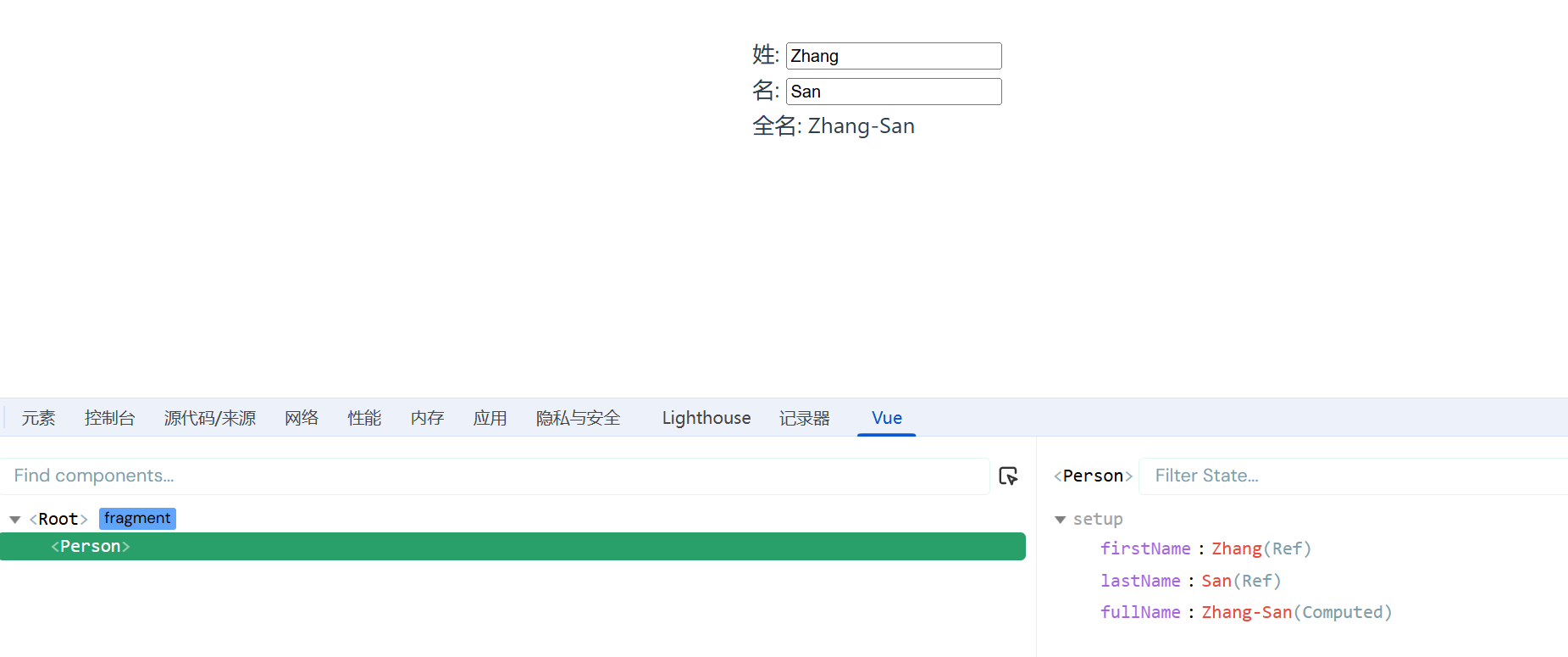
若想直接修改 fullName,是不可以的,这么定义的 fullName 是一个计算属性,且是只读的
<template> <div class="person"> <h3>姓: <input type="text" v-model="firstName" /></h3> <h3>名: <input type="text" v-model="lastName" /></h3> <h3>全名: {{ fullName }}</h3> <div><button @click="updateFullName">update fullName</button></div> </div></template>
<script setup lang="ts" name="Person">import { ref, computed } from "vue";
let firstName = ref("Zhang");let lastName = ref("San");
let fullName = computed(() => { return firstName.value + "-" + lastName.value;});
const updateFullName = () => { fullName.value = "liSi";};</script>

这么定义的 fullName 是一个计算属性,可读可写
<template> <div class="person"> <h3>姓: <input type="text" v-model="firstName" /></h3> <h3>名: <input type="text" v-model="lastName" /></h3> <h3>全名: {{ fullName }}</h3> <div><button @click="updateFullName">update fullName</button></div> </div></template>
<script setup lang="ts" name="Person">import { ref, computed } from "vue";
let firstName = ref("Zhang");let lastName = ref("San");
let fullName = computed({ get() { return firstName.value + "-" + lastName.value; }, set(val) { // val是updateFullName方法修改后返回的新值 // console.log(val); const [str1, str2] = val.split("-"); firstName.value = str1; lastName.value = str2; },});
const updateFullName = () => { fullName.value = "Li-Si";};</script>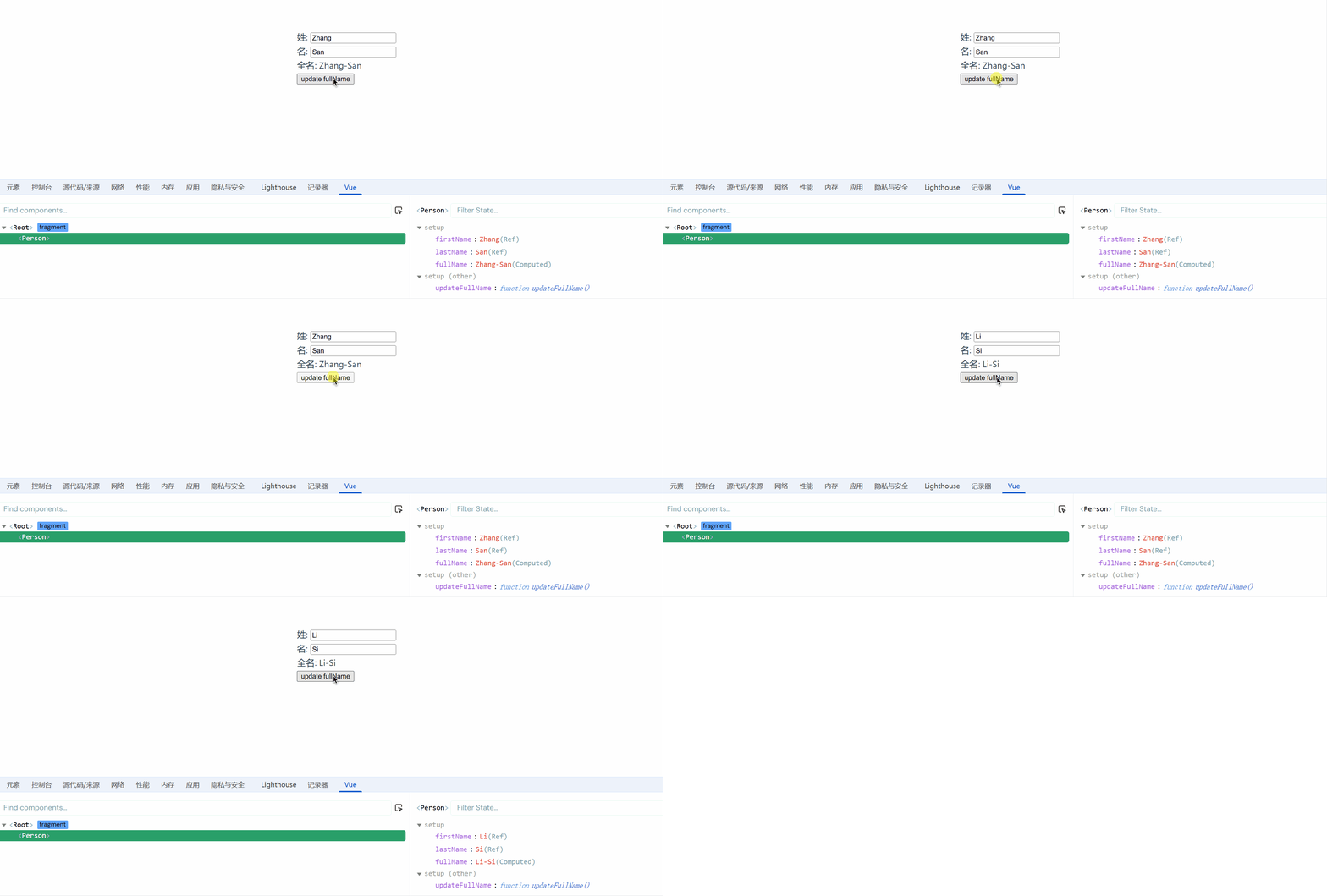
watch
- 作用:监视数据的变化(和
Vue2中的watch作用一致) - 特点:
Vue3中的watch只能监视以下四种数据:
ref定义的数据。reactive定义的数据。- 函数返回一个值(
getter函数)。- 一个包含上述内容的数组。
我们在Vue3中使用watch的时候,通常会遇到以下几种情况:
情况一
监视ref定义的【基本类型】数据:直接写数据名即可,监视的是其value值的改变。
<template> <div class="person"> <h3>情况一:监视【ref】定义的【基本类型】数据</h3> <h3>{{ sum }}</h3> <h3><button @click="add">点击++</button></h3> </div></template>
<script setup lang="ts" name="Person">import { ref, watch } from "vue";
let sum = ref(0);
const add = () => { sum.value++;};
let stopWatch = watch(sum, (newValue, oldValue) => { console.log("新", newValue); console.log("旧", oldValue); if (sum.value == 10) { stopWatch(); // 停止监听 }});</script>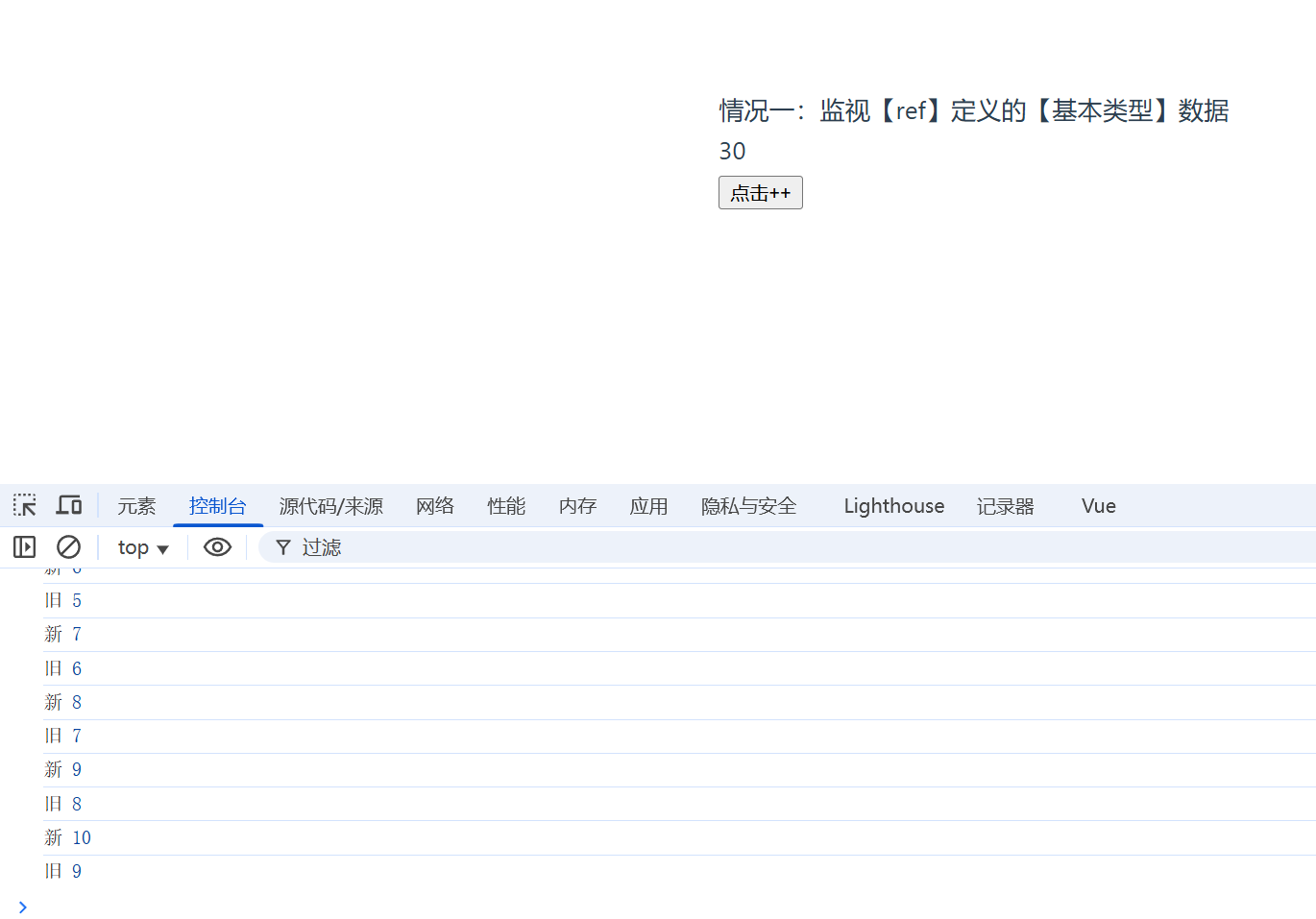
情况二
监视ref定义的【对象类型】数据:直接写数据名,监视的是对象的【地址值】,若想监视对象内部的数据,要手动开启深度监视。
TIP注意:
若修改的是
ref定义的对象中的属性,newValue和oldValue都是新值,因为它们是同一个对象。若修改整个
ref定义的对象,newValue是新值,oldValue是旧值,因为不是同一个对象了。
<template> <div class="person"> <h3>情况二:监视【ref】定义的【对象类型】数据</h3> <h3>{{ person.name }}</h3> <h3>{{ person.age }}</h3> <h3><button @click="changeName">update Name</button></h3> <h3><button @click="changeAge">update Age</button></h3> <h3><button @click="changePerson">修改整个</button></h3> </div></template>
<script setup lang="ts" name="Person">import { ref, watch } from "vue";
let person = ref({ name: "张三", age: 30,});
const changeName = () => { person.value.name += "~";};const changeAge = () => { person.value.age++;};
const changePerson = () => { person.value = { name: "Jack", age: 60 };};
// 监视【ref】定义的【对象类型】数据,监视的是对象的地址值,若想监视对象内部属性的变化,需要手动开启深度监视// watch的第一个参数是:被监视的数据// watch的第二个参数是:监视的回调// watch的第三个参数是:配置对象(deep、immediate等等)watch( person, (newValue, oldValue) => { console.log("新", newValue); console.log("旧", oldValue); }, { deep: true, immediate: true });</script>情况三
监视reactive定义的【对象类型】数据,且默认开启了深度监视。
深度监视不可关闭,且新值旧值都是新值,因为地址没变
<template> <div class="person"> <h3>情况三:监视【reactive】定义的【对象类型】数据</h3> <h3>{{ person.name }}</h3> <h3>{{ person.age }}</h3> <h3><button @click="changeName">update Name</button></h3> <h3><button @click="changeAge">update Age</button></h3> <h3><button @click="changePerson">修改整个</button></h3> </div></template>
<script setup lang="ts" name="Person">import { reactive, watch } from "vue";
let person = reactive({ name: "张三", age: 30,});
const changeName = () => { person.name += "~";};const changeAge = () => { person.age++;};
const changePerson = () => { person = Object.assign(person, { name: "Jack", age: 60 });};
watch(person, (newValue, oldValue) => { console.log("新", newValue); console.log("旧", oldValue);});</script>情况四
监视ref或reactive定义的【对象类型】数据中的某个属性,注意点如下:
- 若该属性值不是【对象类型】,需要写成函数形式。
- 若该属性值是依然是【对象类型】,可直接编,也可写成函数,建议写成函数。
结论:监视的要是对象里的属性,那么最好写函数式,注意点:若是对象监视的是地址值,需要关注对象内部,需要手动开启深度监视。
<template> <div class="person"> <h3>{{ person.name }}</h3> <h3>{{ person.age }}</h3> <h3>{{ person.car.car1 + "、" + person.car.car2 }}</h3> <h3><button @click="changeName">update Name</button></h3> <h3><button @click="changeAge">update Age</button></h3> <h3><button @click="changeCar1">update Car1</button></h3> <h3><button @click="changeCar2">update Car2</button></h3> <h3><button @click="changeCar">修改整个车</button></h3> </div></template>
<script setup lang="ts" name="Person">import { reactive, watch } from "vue";
let person = reactive({ name: "张三", age: 30, car: { car1: "宝马", car2: "奔驰", },});
const changeName = () => { person.name += "~";};const changeAge = () => { person.age++;};
const changeCar1 = () => { person.car.car1 = "奥迪";};const changeCar2 = () => { person.car.car2 = "大众";};const changeCar = () => { person.car = { car1: "雅迪", car2: "台铃" };};
// 监视,情况四:监视响应式对象中的某个属性,且该属性时基本类型的,要写成函数式watch( () => person.name, (newValue, oldValue) => { console.log("新", newValue); console.log("旧", oldValue); });
// 监视,情况四:监视响应式对象中的某个属性,且该属性是对象类型的,可以直接写,也能写函数,更推荐写函数watch( () => person.car, (newValue, oldValue) => { console.log("car变化了", newValue, oldValue); }, { deep: true });</script>情况五
监视上述的多个数据
<template> <div class="person"> <h3>{{ person.name }}</h3> <h3>{{ person.age }}</h3> <h3>{{ person.car.car1 + "、" + person.car.car2 }}</h3> <h3><button @click="changeName">update Name</button></h3> <h3><button @click="changeAge">update Age</button></h3> <h3><button @click="changeCar1">update Car1</button></h3> <h3><button @click="changeCar2">update Car2</button></h3> <h3><button @click="changeCar">修改整个车</button></h3> </div></template>
<script setup lang="ts" name="Person">import { reactive, watch } from "vue";
let person = reactive({ name: "张三", age: 30, car: { car1: "宝马", car2: "奔驰", },});
const changeName = () => { person.name += "~";};const changeAge = () => { person.age++;};
const changeCar1 = () => { person.car.car1 = "奥迪";};const changeCar2 = () => { person.car.car2 = "大众";};const changeCar = () => { person.car = { car1: "雅迪", car2: "台铃" };};
// 监视,情况五:监视上述的多个数据watch( [() => person.name, () => person.car.car1], (newValue, oldValue) => { console.log(newValue, oldValue); }, { deep: true });</script>watchEffect
-
官网:立即运行一个函数,同时响应式地追踪其依赖,并在依赖更改时重新执行该函数。
-
watch对比watchEffect-
都能监听响应式数据的变化,不同的是监听数据变化的方式不同
-
watch:要明确指出监视的数据 -
watchEffect:不用明确指出监视的数据(函数中用到哪些属性,那就监视哪些属性)。
-
<template> <div class="person"> <h3>需求:当水温达到60度,或水位达到80cm时,给服务器发请求</h3> <h3>水温{{ temp }}</h3> <h3>水位{{ height }}</h3> <h3><button @click="changeTemp">改水温</button></h3> <h3><button @click="changeHeight">改高度</button></h3> </div></template>
<script setup lang="ts" name="Person">import { ref, watch, watchEffect } from "vue";
let temp = ref(10);let height = ref(0);
const changeTemp = () => { temp.value += 10;};const changeHeight = () => { height.value += 10;};
// watch([temp, height], (newValue) => {// // console.log(newValue, oldValue);// const [newTemp, newHeight] = newValue;// if (newTemp >= 60 || newHeight >= 80) {// console.log("call server");// }// });
const stopWatch = watchEffect(() => { if (temp.value >= 60 || height.value >= 80) { console.log("call server"); } if (temp.value === 100) { stopWatch(); // 取消监视 }});</script>标签的 ref 属性
-
用在普通
DOM标签上,获取的是DOM节点。 -
用在组件标签上,获取的是组件实例对象。
ref 放在标签上
拿的是DOM 元素
示例:
这样写有问题,引用组件情况下,与其他页面的 id 重复了
<template> <div class="person"> <h3 id="title">亚洲</h3> <h3>中国</h3> <h3><button @click="showLog">show log</button></h3> </div></template>
<script setup lang="ts">defineOptions({ name: "Person",});const showLog = () => { console.log(document.getElementById("title"));};</script><template> <h2 id="title">你好</h2> <Person /></template>
<script setup lang="ts">import Person from "./components/Person.vue";
defineOptions({ name: "App",});</script><style scoped></style>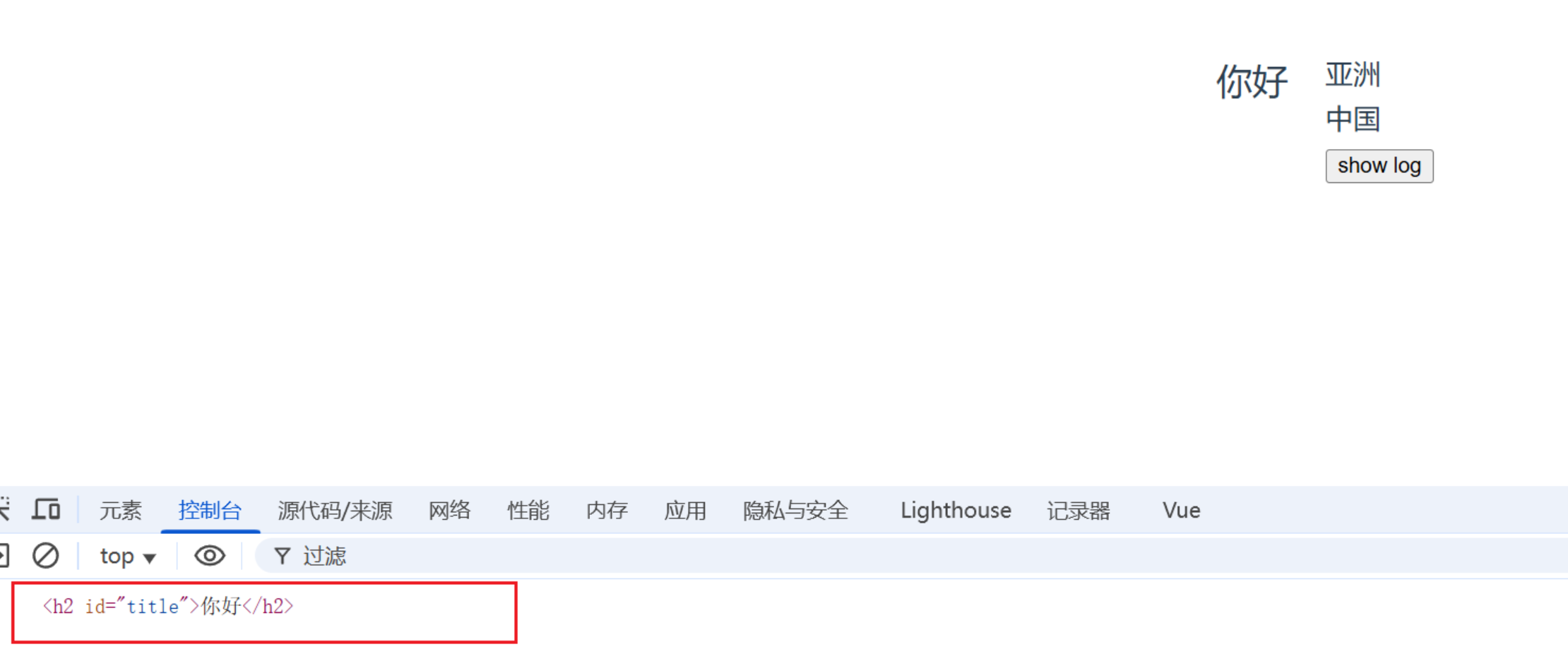
这样才是对的 ⬇️
<template> <div class="person"> <h3 ref="title">亚洲</h3> <h3>中国</h3> <h3><button @click="showLog">show log</button></h3> </div></template>
<script setup lang="ts">import { ref } from "vue";
defineOptions({ name: "Person",});
let title = ref();const showLog = () => { console.log(title.value);};</script>
<style scoped>.person:first-child { font-size: 12px;}</style>

data-v-xxxx 这个标记,是因为样式中有了scoped
ref 放在组件身上
拿的是组件实例对象
子传父
<template> <div class="person"> <h3 ref="title">亚洲</h3> <h3>中国</h3> <h3><button @click="showLog">show log</button></h3> </div></template>
<script setup lang="ts">import { ref, defineExpose } from "vue";
defineOptions({ name: "Person",});
let title = ref();
let num1 = ref(0);let num2 = ref(1);let num3 = ref(2);const showLog = () => { console.log(title.value);};
// 使用defineExpose,父组件才能拿到num1, num2, num3// 使用defineExpose将组件中的数据交给外部defineExpose({ num1, num2, num3 });</script>
<style scoped>.person:first-child { font-size: 12px;}</style><template> <h2 id="title">你好</h2> <Person ref="child" /> <h2><button @click="showLog">点击展示Person数据</button></h2></template>
<script setup lang="ts">import { ref } from "vue";import Person from "./components/Person.vue";
defineOptions({ name: "App",});
const child = ref();
const showLog = () => { console.log(child.value); console.log(child.value.num1); console.log(child.value.num2); console.log(child.value.num3);};</script><style scoped></style>
defineExpose
TIP
defineExpose用于明确地暴露组件的属性或方法给父组件。默认情况下,使用<script setup>定义的组件是完全封闭的,即其内部的状态和方法对外部(父组件)是不可见的。如果你希望某些状态或方法能够被父组件访问,就需要使用 defineExpose。
ts 接口、泛型、自定义类型
// 定义一个接口,用于限制person对象的具体属性
// 暴露方式: 1.默认暴露 2.分别暴露 3.统一暴露export interface PersonInter { id: string; name: string; age: number;}
// 自定义类型export type Persons = Array<PersonInter>;<template> <div class="person"></div></template>
<script setup lang="ts">// 如果引入的是值,那么就不用type; 但PersonInter是一种约束,就需要标记它是一个类型import { type PersonInter, type Persons } from "@/types";
defineOptions({ name: "Person",});
let person: PersonInter = { id: "xxxx", name: "Jack", age: 30 };
let personList: Persons = [ { id: "xxxx1", name: "Jack", age: 30 }, { id: "xxxx2", name: "Marry", age: 23 }, { id: "xxxx3", name: "Lily", age: 22 },];</script>
<style scoped>.person:first-child { font-size: 12px;}</style>props
父传子 简单 demo
可理解为 父传给子一个a,值是你好
<template> <Person a="你好" b="哈哈" /></template>
<script setup lang="ts">import Person from "./components/Person.vue";
defineOptions({ name: "App",});</script><style scoped></style><template> <div class="person"> <h2>{{ a }}</h2> <h2>{{ b }}</h2> </div></template>
<script setup lang="ts">import { defineProps } from "vue";
defineOptions({ name: "Person",});
let x = defineProps(["a", "b"]);console.log(x);console.log(x.a);</script>
<style scoped></style>
简单测试
 它的值是,被解析为:
 特例就是,ref 不需要加冒号
:
完整示例
<template> <Person :list="personList" /></template>
<script setup lang="ts">import { reactive } from "vue";import Person from "./components/Person.vue";import type { Persons } from "./types";
defineOptions({ name: "App",});
let personList = reactive<Persons>([ { id: "qwerasdf1", name: "Lily", age: 20 }, { id: "qwerasdf2", name: "Jack", age: 34 }, { id: "qwerasdf3", name: "Mary", age: 45 },]);</script><style scoped></style><template> <div class="person"> <ul> <li v-for="item in list" :key="item.id"> {{ item.name }}-{{ item.age }} </li> </ul> </div></template>
<script setup lang="ts">import type { Persons } from "@/types";import { withDefaults } from "vue";
defineOptions({ name: "Person",});
// 只接收listlet x = defineProps(["list"]);
// 接收list+限制类型defineProps<{ list: Persons }>();
// 接收list + 限制类型 + 限制必要性(可传,可不传) + 指定默认值withDefaults(defineProps<{ list?: Persons }>(), { list: () => [{ id: "0001", name: "康师傅", age: 34 }],});</script>
<style scoped></style>defineProps
TIP
在 vue3 中,defineXXX 是宏函数,宏函数不用引入可直接使用
defineProps是 Vue 3 提供的一个编译时宏(compile-time macro)用于在<script setup>中声明和获取 props。当你需要从父组件向子组件传递数据时,你可以在子组件中使用defineProps来接收这些数据。
生命周期
-
概念:
Vue组件实例在创建时要经历一系列的初始化步骤,在此过程中Vue会在合适的时机,调用特定的函数,从而让开发者有机会在特定阶段运行自己的代码,这些特定的函数统称为:生命周期钩子 -
规律:
生命周期整体分为四个阶段,分别是:创建、挂载、更新、销毁,每个阶段都有两个钩子,一前一后。
-
Vue2的生命周期创建阶段:
beforeCreate、created挂载阶段:
beforeMount、mounted更新阶段:
beforeUpdate、updated销毁阶段:
beforeDestroy、destroyed -
Vue3的生命周期创建阶段:
setup挂载阶段:
onBeforeMount、onMounted更新阶段:
onBeforeUpdate、onUpdated卸载阶段:
onBeforeUnmount、onUnmounted -
常用的钩子:
onMounted(挂载完毕)、onUpdated(更新完毕)、onBeforeUnmount(卸载之前)
又称生命周期、生命周期函数、生命周期钩子
组件的生命周期
vue2 生命周期:
创建 挂载 更新 销毁

vue3 生命周期

demo如下
<template> <div class="person"> <h3>当前sum:{{ sum }}</h3> <h3><button @click="sumAdd">点击++</button></h3> </div></template>
<script setup lang="ts">import { ref, onBeforeMount, onMounted, onBeforeUpdate, onUpdated, onBeforeUnmount, onUnmounted,} from "vue";
defineOptions({ name: "Person",});
let sum = ref(0);
const sumAdd = () => { sum.value += 1;};
console.log("创建");
onBeforeMount(() => { console.log("挂载前");});
onMounted(() => { console.log("挂载完毕");});
onBeforeUpdate(() => { console.log("更新前");});
onUpdated(() => { console.log("更新完毕");});
onBeforeUnmount(() => { console.log("卸载前");});onUnmounted(() => { console.log("卸载完毕");});</script>
<style scoped></style><template> <Person v-if="isShow" /></template>
<script setup lang="ts">import { ref } from "vue";import Person from "./components/Person.vue";
defineOptions({ name: "App",});
let isShow = ref(true);</script><style scoped></style>自定义 hook
-
什么是
hook?—— 本质是一个函数,把setup函数中使用的Composition API进行了封装,类似于vue2.x中的mixin。 -
自定义
hook的优势:复用代码, 让setup中的逻辑更清楚易懂。
如下代码,功能齐全但是,数据与方法比较混乱,可以使用 hook 进行改造
<template> <div class="person"> <h3>当前sum:{{ sum }}</h3> <h3><button @click="sumAdd">点击++</button></h3> <hr /> <div> <img v-for="(dog, index) in dogList" :src="dog" :key="index" /> </div> <div><button @click="addDog">来一只狗</button></div> </div></template>
<script setup lang="ts">import { reactive, ref } from "vue";import axios from "axios";
defineOptions({ name: "Person",});
let sum = ref(0);
const sumAdd = () => { sum.value += 1;};
let dogList = reactive([ "https://images.dog.ceo/breeds/pembroke/n02113023_7316.jpg",]);
const addDog = async () => { try { let result = await axios.get( "https://dog.ceo/api/breed/pembroke/images/random" ); dogList.push(result.data.message); console.log(result.data.message); } catch (error) { alert(error); }};</script>
<style scoped>.person { width: 500px; height: 300px;}img { height: 100px; margin-right: 10px;}</style>创建 hooks 文件夹,将每个不同模块进行拆分,命名必须使用useXXX这种形式
改进过后
<template> <div class="person"> <h3>当前sum:{{ sum }}</h3> <h3><button @click="sumAdd">点击++</button></h3> <hr /> <div> <img v-for="(dog, index) in dogList" :src="dog" :key="index" /> </div> <div><button @click="addDog">来一只狗</button></div> </div></template>
<script setup lang="ts">defineOptions({ name: "Person",});import useDog from "@/hooks/useDog";import useSum from "@/hooks/useSum";
const { dogList, addDog } = useDog();const { sum, sumAdd } = useSum();</script>
<style scoped>.person { width: 500px; height: 300px;}img { height: 100px; margin-right: 10px;}</style>import { reactive, onMounted } from "vue";import axios from "axios";export default () => { // 钩子函数也是不影响使用的 onMounted(() => { addDog(); });
let dogList = reactive([ "https://images.dog.ceo/breeds/pembroke/n02113023_7316.jpg", ]);
const addDog = async () => { try { let result = await axios.get( "https://dog.ceo/api/breed/pembroke/images/random" ); dogList.push(result.data.message); console.log(result.data.message); } catch (error) { alert(error); } }; return { dogList, addDog };};import { ref } from "vue";export default () => { let sum = ref(0);
const sumAdd = () => { sum.value += 1; }; return { sum, sumAdd };};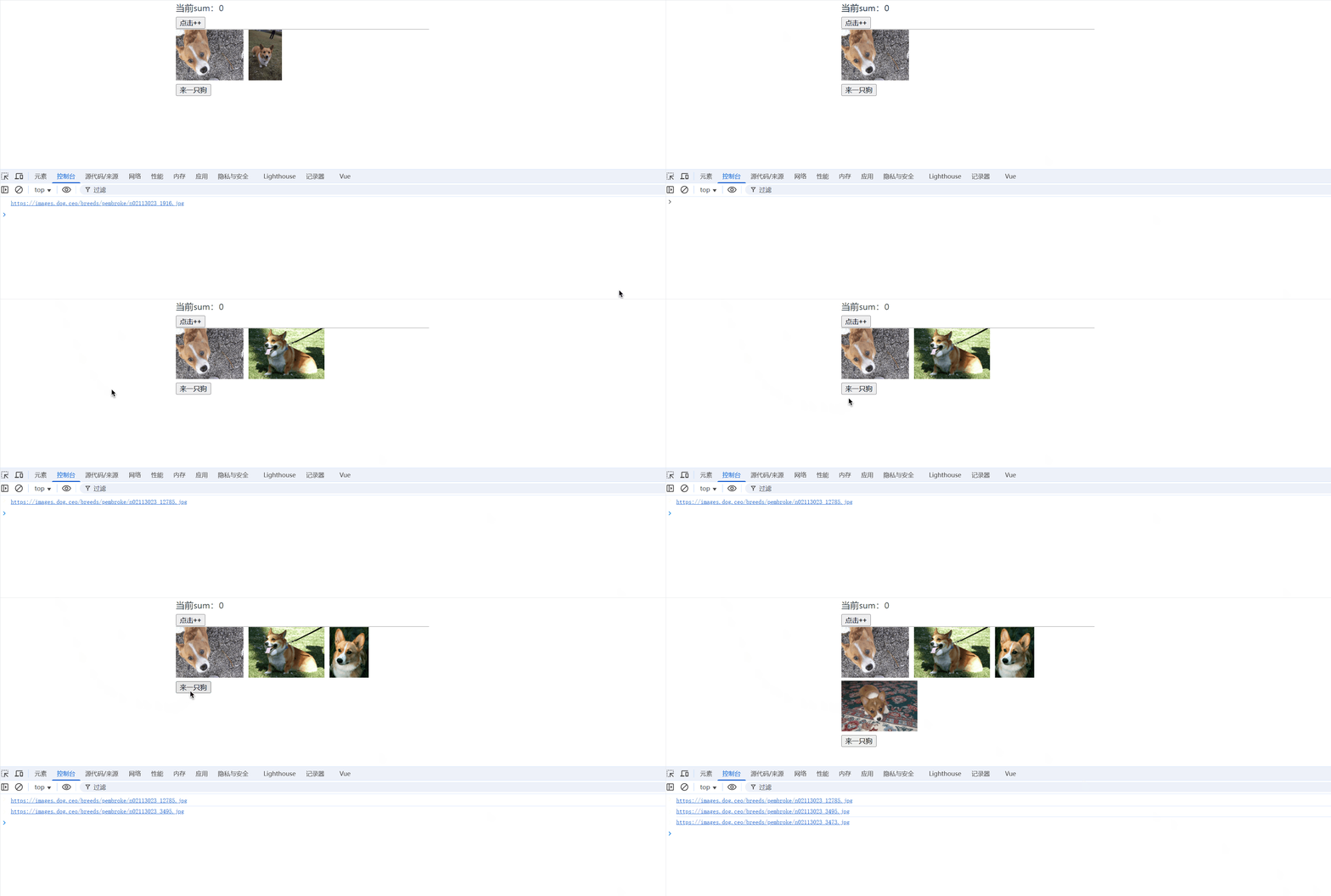
路由

路由安装
npm i vue-router基本切换
在src下创建router文件夹,创建index.ts文件
// 创建路由器,暴露出去
// 1.引入crateRouterimport { createRouter, createWebHashHistory } from "vue-router";
// 2.创建路由器const router = createRouter({ history: createWebHashHistory(), routes: [ { path: "/home", name: "home", component: () => import("@/views/Home.vue"), }, { path: "/about", name: "about", component: () => import("../views/About.vue"), }, { path: "/news", name: "news", component: () => import("../views/News.vue"), }, ],});
export default router;import "./assets/main.css";
import { createApp } from "vue";import App from "./App.vue";// 引入路由器import router from "./router";
// 创建一个应用const app = createApp(App);// 使用路由器app.use(router);// 挂载整个应用到app容器中app.mount("#app");<template> <div> <h1>路由 示例</h1> <div class="navigate"> <RouterLink to="/home" active-class="highlight">首页</RouterLink> <RouterLink to="/news" active-class="highlight">新闻</RouterLink> <RouterLink to="/about" active-class="highlight">关于</RouterLink> </div> <div class="main-content"> <RouterView></RouterView> </div> </div></template>
<script setup lang="ts">import { RouterView, RouterLink } from "vue-router";
defineOptions({ name: "App",});</script><style scoped>.highlight { color: aqua; background-color: rgb(253, 238, 219);}.navigate { width: 100%; height: 100px;}.navigate a { margin-left: 100px; display: block; float: left; border: 1px solid black; padding: 10px; border-radius: 10px; text-decoration: none;}
.main-content { border: 1px solid rgb(177, 125, 211); overflow: hidden; height: 350px; border-radius: 20px;}</style>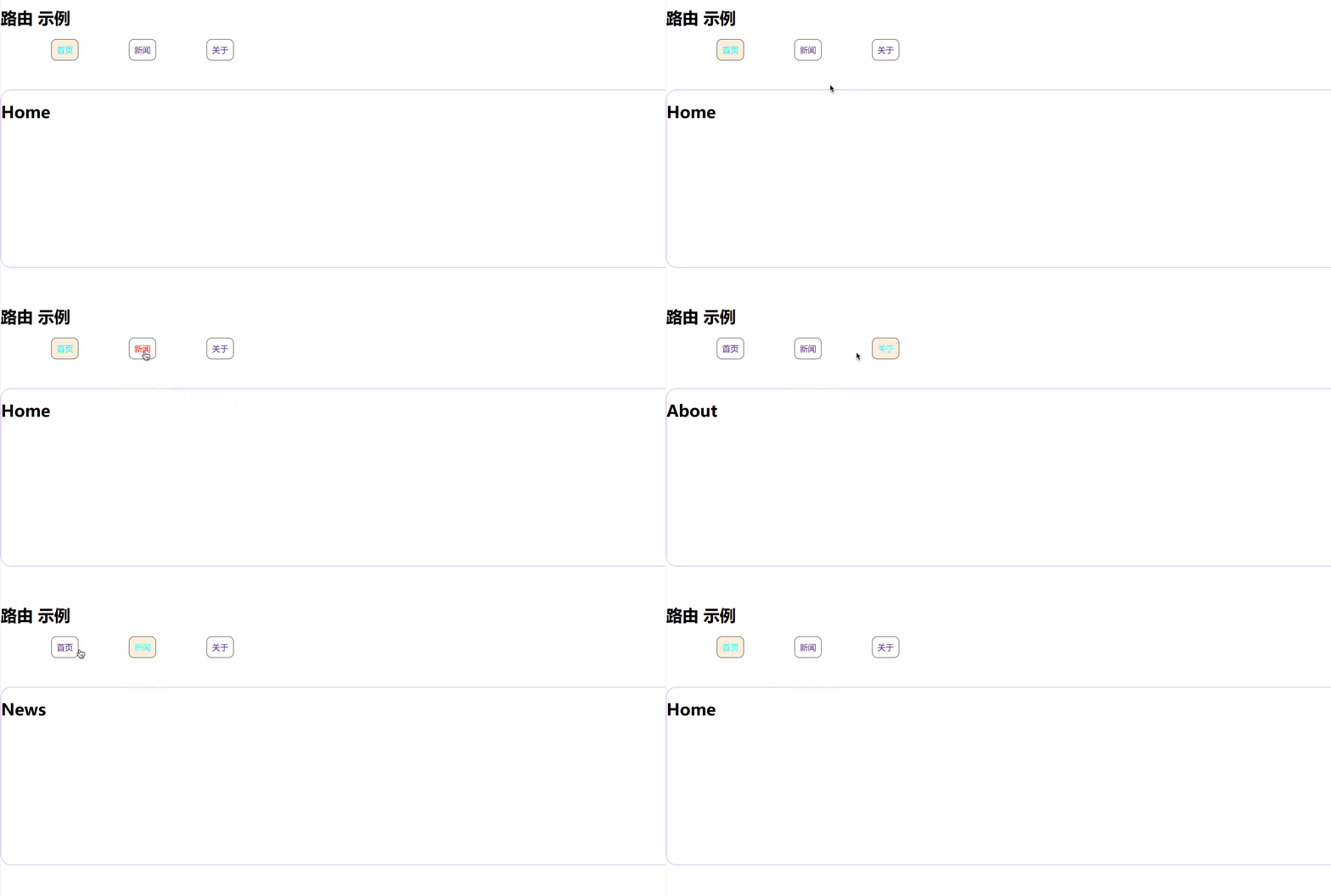
注意点
-
路由组件通常存放在
pages或views文件夹,一般组件通常存放在components文件夹。 -
通过点击导航,视觉效果上“消失” 了的路由组件,默认是被卸载掉的,需要的时候再去挂载。
-
路由组件 靠路由规则渲染出来的
-
一般组件 亲手写标签出来的

路由器工作模式
history模式
优点:
URL更加美观,不带有#,更接近传统的网站URL。缺点:后期项目上线,需要服务端配合处理路径问题,否则刷新会有
404错误。
const router = createRouter({ history: createWebHistory(), //history模式 /******/});hash模式
优点:兼容性更好,因为不需要服务器端处理路径。
缺点:
URL带有#不太美观,且在SEO优化方面相对较差。
const router = createRouter({ history: createWebHashHistory(), //hash模式 /******/});to 的两种写法
<!-- 第一种:to的字符串写法 --><router-link active-class="active" to="/home">主页</router-link>
<!-- 第二种:to的对象写法 --><router-link active-class="active" :to="{ path: '/home' }">Home</router-link>命名路由
// 创建路由器,暴露出去
// 1.引入crateRouterimport { createRouter, createWebHashHistory } from "vue-router";import About from "@/views/About.vue";import Home from "@/views/Home.vue";import News from "@/views/News.vue";
// 2.创建路由器const router = createRouter({ history: createWebHashHistory(), routes: [ { path: "/home", component: () => Home, }, { path: "/about", component: () => About, }, { name: "xinwen", path: "/news", component: () => News, }, ],});
export default router;<RouterLink :to="{ name: 'xinwen' }" active-class="highlight">新闻</RouterLink>嵌套路由
编写子组件
<template> <h3>编号:xxx</h3> <h3>标题:xxx</h3> <h3>详情:xxx</h3></template>
<script lang="ts" setup></script>
<style scoped></style>配置路由规则,使用children配置项
// 创建路由器,暴露出去
// 1.引入crateRouterimport { createRouter, createWebHashHistory } from "vue-router";
// 2.创建路由器const router = createRouter({ history: createWebHashHistory(), routes: [ { path: "/home", name: "home", component: () => import("@/views/Home.vue"), }, { path: "/about", name: "about", component: () => import("@/views/About.vue"), }, { path: "/news", name: "news", component: () => import("@/views/News.vue"), children: [ { path: "detail", // 子路由不用写 ‘/’ name: "detail", component: () => import("@/components/Detail.vue"), }, ], }, ],});
export default router;跳转路由(记得要加完整路径)
<template> <div class="newsList"> <RouterLink :to="{ path: '/news/detail' }" v-for="news in newsList">{{ news.title }}</RouterLink> </div> <div class="news-detail"> <RouterView></RouterView> </div></template>
<script setup lang="ts">import { reactive } from "vue";
const newsList = reactive([ { id: "1904165055277039616", title: "海关总署就芬太尼相关问题答记者问", content: "海关总署有关负责人:《麻醉药品品种目录》(2013年版)里面列管的阿芬太尼、芬太尼、瑞芬太尼、舒芬太尼等具有药品属性的芬太尼按照麻醉药品管理。", }, { id: "1904165055281233920", title: "NASA“撤回”登月宇航员“多元化”承诺", content: "今日俄罗斯电视台网站3月23日报道,美国国家航空航天局(NASA)收回其公开承诺,即在阿耳忒弥斯登月计划下,将第一位女性和第一位有色人种送上月球。", }, { id: "1904165055281233921", title: "春天是最懂氛围感的", content: "春暖花开,春意融融。近日,北京各大公园里的春天已藏不住了,当古建与春天相遇,一场跨越时空的浪漫邂逅开启。人勤春早,收藏这组壁纸,新的一周,一起与美好同行", },]);</script>
<style scoped>.newsList { margin-left: 30px; float: left; width: 400px;}.newsList a { margin-right: 20px; display: block; margin-bottom: 20px;}.news-detail { width: 500px; height: 300px; border: 2px solid rgb(232, 193, 193); float: left; border-radius: 20px;}</style>记得去该组件中预留一个<router-view>
路由传参-query 参数
第一种方式
<template> <div class="newsList"> <RouterLink :to="`/news/detail?id=${news.id}&title=${news.title}&content=${news.content}`" v-for="news in newsList" >{{ news.title }}</RouterLink > </div> <div class="news-detail"> <RouterView></RouterView> </div></template>
<script setup lang="ts">import { reactive } from "vue";
const newsList = reactive([ { id: "1904165055277039616", title: "海关总署就芬太尼相关问题答记者问", content: "海关总署有关负责人:《麻醉药品品种目录》(2013年版)里面列管的阿芬太尼、芬太尼、瑞芬太尼、舒芬太尼等具有药品属性的芬太尼按照麻醉药品管理。", }, { id: "1904165055281233920", title: "NASA“撤回”登月宇航员“多元化”承诺", content: "今日俄罗斯电视台网站3月23日报道,美国国家航空航天局(NASA)收回其公开承诺,即在阿耳忒弥斯登月计划下,将第一位女性和第一位有色人种送上月球。", }, { id: "1904165055281233921", title: "春天是最懂氛围感的", content: "春暖花开,春意融融。近日,北京各大公园里的春天已藏不住了,当古建与春天相遇,一场跨越时空的浪漫邂逅开启。人勤春早,收藏这组壁纸,新的一周,一起与美好同行", },]);</script>
<style scoped>.newsList { margin-left: 30px; float: left; width: 400px;}.newsList a { margin-right: 20px; display: block; margin-bottom: 20px;}.news-detail { width: 500px; height: 300px; border: 2px solid rgb(232, 193, 193); float: left; border-radius: 20px;}</style><template> <h3>编号:{{ query.id }}</h3> <h3>标题:{{ query.title }}</h3> <h3>详情:{{ query.content }}</h3></template>
<script lang="ts" setup>import { toRefs } from "vue";import { useRoute } from "vue-router";defineOptions({ name: "Detail",});
let route = useRoute();let { query } = toRefs(route);console.log("route", route);</script>
<style scoped></style>第二种方式
<template> <div class="newsList"> <RouterLink :to="{ path: '/news/detail', query: { id: news.id, content: news.content, title: news.title, }, }" v-for="news in newsList" >{{ news.title }}</RouterLink > </div> <div class="news-detail"> <RouterView></RouterView> </div></template>
<script setup lang="ts">import { reactive } from "vue";
const newsList = reactive([ { id: "1904165055277039616", title: "海关总署就芬太尼相关问题答记者问", content: "海关总署有关负责人:《麻醉药品品种目录》(2013年版)里面列管的阿芬太尼、芬太尼、瑞芬太尼、舒芬太尼等具有药品属性的芬太尼按照麻醉药品管理。", }, { id: "1904165055281233920", title: "NASA“撤回”登月宇航员“多元化”承诺", content: "今日俄罗斯电视台网站3月23日报道,美国国家航空航天局(NASA)收回其公开承诺,即在阿耳忒弥斯登月计划下,将第一位女性和第一位有色人种送上月球。", }, { id: "1904165055281233921", title: "春天是最懂氛围感的", content: "春暖花开,春意融融。近日,北京各大公园里的春天已藏不住了,当古建与春天相遇,一场跨越时空的浪漫邂逅开启。人勤春早,收藏这组壁纸,新的一周,一起与美好同行", },]);</script>
<style scoped>.newsList { margin-left: 30px; float: left; width: 400px;}.newsList a { margin-right: 20px; display: block; margin-bottom: 20px;}.news-detail { width: 500px; height: 300px; border: 2px solid rgb(232, 193, 193); float: left; border-radius: 20px;}</style><template> <h3>编号:{{ query.id }}</h3> <h3>标题:{{ query.title }}</h3> <h3>详情:{{ query.content }}</h3></template>
<script lang="ts" setup>import { toRefs } from "vue";import { useRoute } from "vue-router";defineOptions({ name: "Detail",});
let route = useRoute();let { query } = toRefs(route);console.log("route", route);</script>
<style scoped></style>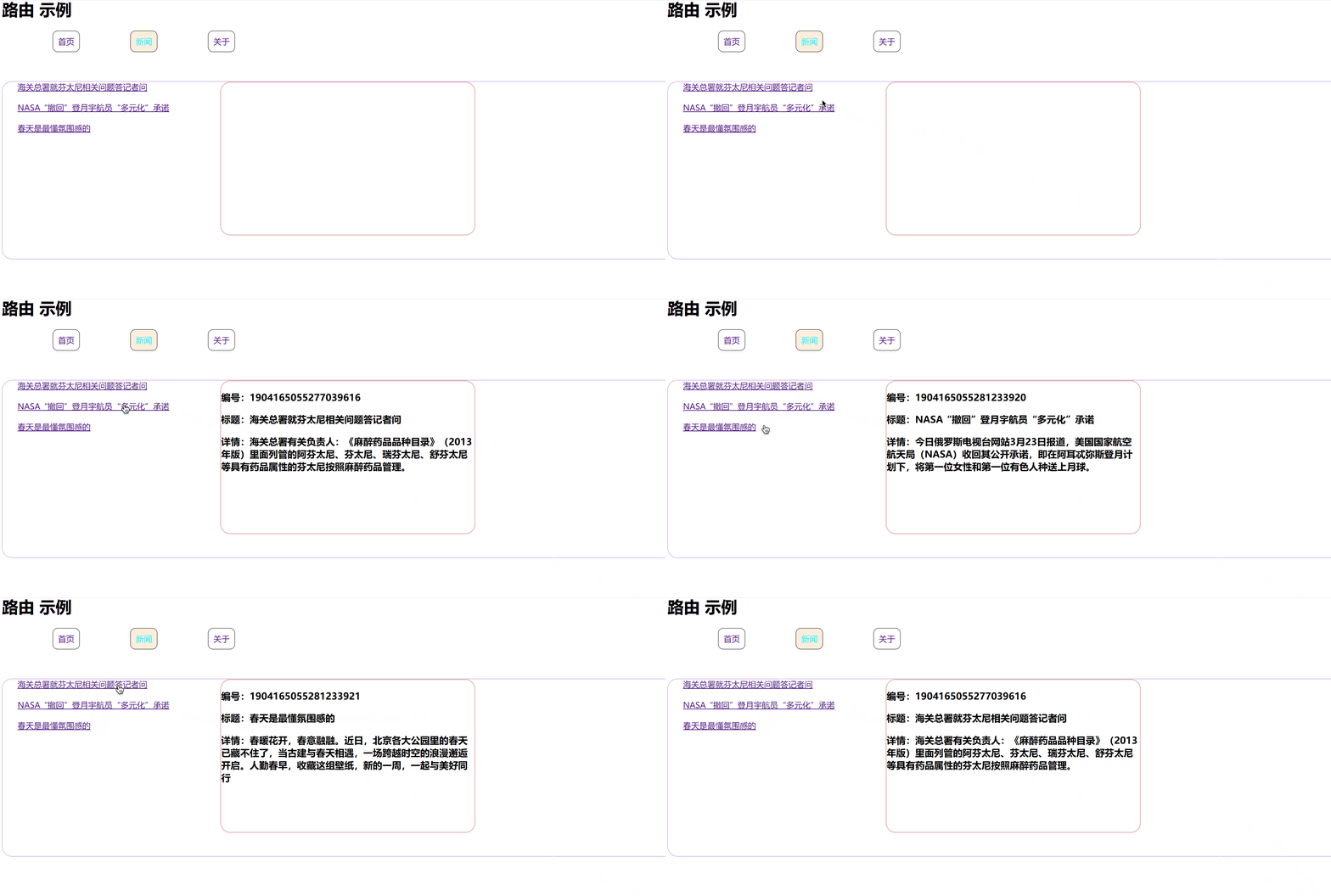
params 参数
第一种方式
<template> <div class="newsList"> <RouterLink v-for="news in newsList" :to="`/news/detail/${news.id}/${news.title}/${news.content}`" >{{ news.title }}</RouterLink > </div> <div class="news-detail"> <RouterView></RouterView> </div></template>
<script setup lang="ts">import { reactive } from "vue";
const newsList = reactive([ { id: "1904165055277039616", title: "海关总署就芬太尼相关问题答记者问", content: "海关总署有关负责人:《麻醉药品品种目录》(2013年版)里面列管的阿芬太尼、芬太尼、瑞芬太尼、舒芬太尼等具有药品属性的芬太尼按照麻醉药品管理。", }, { id: "1904165055281233920", title: "NASA“撤回”登月宇航员“多元化”承诺", content: "今日俄罗斯电视台网站3月23日报道,美国国家航空航天局(NASA)收回其公开承诺,即在阿耳忒弥斯登月计划下,将第一位女性和第一位有色人种送上月球。", }, { id: "1904165055281233921", title: "春天是最懂氛围感的", content: "春暖花开,春意融融。近日,北京各大公园里的春天已藏不住了,当古建与春天相遇,一场跨越时空的浪漫邂逅开启。人勤春早,收藏这组壁纸,新的一周,一起与美好同行", },]);</script>
<style scoped>.newsList { margin-left: 30px; float: left; width: 400px;}.newsList a { margin-right: 20px; display: block; margin-bottom: 20px;}.news-detail { width: 500px; height: 300px; border: 2px solid rgb(232, 193, 193); float: left; border-radius: 20px;}</style>
// 创建路由器,暴露出去
// 1.引入crateRouterimport { createRouter, createWebHashHistory } from "vue-router";
// 2.创建路由器const router = createRouter({ history: createWebHashHistory(), routes: [ { path: "/home", name: "home", component: () => import("@/views/Home.vue"), }, { path: "/about", name: "about", component: () => import("@/views/About.vue"), }, { path: "/news", name: "news", component: () => import("@/views/News.vue"), children: [ { path: "detail/:id/:title/:content?", // 加? 表示可传可不传 name: "detail", component: () => import("@/components/Detail.vue"), }, ], }, ],});
export default router;<template> <h3>编号:{{ params.id }}</h3> <h3>标题:{{ params.title }}</h3> <h3>详情:{{ params.content }}</h3></template>
<script lang="ts" setup>import { toRefs } from "vue";import { useRoute } from "vue-router";defineOptions({ name: "Detail",});
let route = useRoute();let { params } = toRefs(route);console.log("route", route);</script>
<style scoped></style>第二种方式
<template> <div class="newsList"> <RouterLink v-for="news in newsList" :to="{ name: 'detail', params: { id: news.id, title: news.title, content: news.content, }, }" >{{ news.title }}</RouterLink > </div> <div class="news-detail"> <RouterView></RouterView> </div></template>
<script setup lang="ts">import { reactive } from "vue";
const newsList = reactive([ { id: "1904165055277039616", title: "海关总署就芬太尼相关问题答记者问", content: "海关总署有关负责人:《麻醉药品品种目录》(2013年版)里面列管的阿芬太尼、芬太尼、瑞芬太尼、舒芬太尼等具有药品属性的芬太尼按照麻醉药品管理。", }, { id: "1904165055281233920", title: "NASA“撤回”登月宇航员“多元化”承诺", content: "今日俄罗斯电视台网站3月23日报道,美国国家航空航天局(NASA)收回其公开承诺,即在阿耳忒弥斯登月计划下,将第一位女性和第一位有色人种送上月球。", }, { id: "1904165055281233921", title: "春天是最懂氛围感的", content: "春暖花开,春意融融。近日,北京各大公园里的春天已藏不住了,当古建与春天相遇,一场跨越时空的浪漫邂逅开启。人勤春早,收藏这组壁纸,新的一周,一起与美好同行", },]);</script>
<style scoped>.newsList { margin-left: 30px; float: left; width: 400px;}.newsList a { margin-right: 20px; display: block; margin-bottom: 20px;}.news-detail { width: 500px; height: 300px; border: 2px solid rgb(232, 193, 193); float: left; border-radius: 20px;}</style>WARNING
如果路由中有占位,但传参时没有传会报错,可以通过在路由中这样写:
path:'detail/:id/:title/:content?'添加?即可,配置参数必要性传递
params参数时,若使用to的对象写法,必须使用name配置项,不能用path,并且该写法不能传递数组和对象传递
params参数时,需要提前在规则中占位。
路由 props 配置
第一种写法:将路由收到的所有 params 参数作为 props 传给路由组件
// 创建路由器,暴露出去
// 1.引入crateRouterimport { createRouter, createWebHashHistory } from "vue-router";
// 2.创建路由器const router = createRouter({ history: createWebHashHistory(), routes: [ { path: "/home", name: "home", component: () => import("@/views/Home.vue"), }, { path: "/about", name: "about", component: () => import("@/views/About.vue"), }, { path: "/news", name: "news", component: () => import("@/views/News.vue"), children: [ { path: "detail/:id/:title/:content?", name: "detail", component: () => import("@/components/Detail.vue"), props: true, }, ], }, ],});
export default router;<template> <h3>编号:{{ id }}</h3> <h3>标题:{{ title }}</h3> <h3>详情:{{ content }}</h3></template>
<script lang="ts" setup>import { toRefs } from "vue";import { useRoute } from "vue-router";defineOptions({ name: "Detail",});
defineProps(["id", "title", "content"]);</script>
<style scoped></style>第二种写法:函数写法,可以自己决定将什么作为 props 给路由组件
// 创建路由器,暴露出去
// 1.引入crateRouterimport { createRouter, createWebHashHistory } from "vue-router";
// 2.创建路由器const router = createRouter({ history: createWebHashHistory(), routes: [ { path: "/home", name: "home", component: () => import("@/views/Home.vue"), }, { path: "/about", name: "about", component: () => import("@/views/About.vue"), }, { path: "/news", name: "news", component: () => import("@/views/News.vue"), children: [ { path: "detail", name: "detail", component: () => import("@/components/Detail.vue"), // props: true, props(route) { return route.query; }, }, ], }, ],});
export default router;<template> <div class="newsList"> <RouterLink v-for="news in newsList" :to="{ name: 'detail', query: { id: news.id, title: news.title, content: news.content, }, }" >{{ news.title }}</RouterLink > </div> <div class="news-detail"> <RouterView></RouterView> </div></template>
<script setup lang="ts">import { reactive } from "vue";
const newsList = reactive([ { id: "1904165055277039616", title: "海关总署就芬太尼相关问题答记者问", content: "海关总署有关负责人:《麻醉药品品种目录》(2013年版)里面列管的阿芬太尼、芬太尼、瑞芬太尼、舒芬太尼等具有药品属性的芬太尼按照麻醉药品管理。", }, { id: "1904165055281233920", title: "NASA“撤回”登月宇航员“多元化”承诺", content: "今日俄罗斯电视台网站3月23日报道,美国国家航空航天局(NASA)收回其公开承诺,即在阿耳忒弥斯登月计划下,将第一位女性和第一位有色人种送上月球。", }, { id: "1904165055281233921", title: "春天是最懂氛围感的", content: "春暖花开,春意融融。近日,北京各大公园里的春天已藏不住了,当古建与春天相遇,一场跨越时空的浪漫邂逅开启。人勤春早,收藏这组壁纸,新的一周,一起与美好同行", },]);</script>
<style scoped>.newsList { margin-left: 30px; float: left; width: 400px;}.newsList a { margin-right: 20px; display: block; margin-bottom: 20px;}.news-detail { width: 500px; height: 300px; border: 2px solid rgb(232, 193, 193); float: left; border-radius: 20px;}</style><template> <h3>编号:{{ id }}</h3> <h3>标题:{{ title }}</h3> <h3>详情:{{ content }}</h3></template>
<script lang="ts" setup>defineOptions({ name: "Detail",});
defineProps(["id", "title", "content"]);</script>
<style scoped></style>第三种写法:对象写法,可以自己决定将什么作为 props 给路由组件
这种写法只能写死,没有什么意义
children: [ { path: "detail/:id/:title/:content", component: () => import("@/components/Detail.vue"), // props: true // props(route) { // return route.query // } props: { x: 1, y: 2, z: 3, }, },];replace属性
-
作用:控制路由跳转时操作浏览器历史记录的模式。
-
浏览器的历史记录有两种写入方式:分别为
push和replace:
push是追加历史记录(默认值)。replace是替换当前记录。
- 开启
replace模式:
<RouterLink replace .......>News</RouterLink>编程式路由导航
可以理解为,脱离<RouterLink/>实现路由跳转
简单demo首页停留三秒后,跳转
<template> <h1>Home</h1></template>
<script setup lang="ts">import { onMounted } from "vue";import { useRouter } from "vue-router";
let router = useRouter();
onMounted(() => { setTimeout(() => { router.push("news"); }, 3000);});</script>
<style scoped></style>实现点击按钮也可查看新闻详情⬇️
<template> <div class="newsList" v-for="news in newsList"> <button @click="showDetail(news)">查看</button> <RouterLink :to="{ name: 'detail', params: { id: news.id, title: news.title, content: news.content, }, }" >{{ news.title }}</RouterLink > </div> <div class="news-detail"> <RouterView></RouterView> </div></template>
<script setup lang="ts">import { reactive } from "vue";import { useRouter } from "vue-router";
const newsList = reactive([ { id: "1904165055277039616", title: "海关总署就芬太尼相关问题答记者问", content: "海关总署有关负责人:《麻醉药品品种目录》(2013年版)里面列管的阿芬太尼、芬太尼、瑞芬太尼、舒芬太尼等具有药品属性的芬太尼按照麻醉药品管理。", }, { id: "1904165055281233920", title: "NASA“撤回”登月宇航员“多元化”承诺", content: "今日俄罗斯电视台网站3月23日报道,美国国家航空航天局(NASA)收回其公开承诺,即在阿耳忒弥斯登月计划下,将第一位女性和第一位有色人种送上月球。", }, { id: "1904165055281233921", title: "春天是最懂氛围感的", content: "春暖花开,春意融融。近日,北京各大公园里的春天已藏不住了,当古建与春天相遇,一场跨越时空的浪漫邂逅开启。人勤春早,收藏这组壁纸,新的一周,一起与美好同行", },]);let router = useRouter();
interface NewsInter { id: string; title: string; content: string;}const showDetail = (news: NewsInter) => { // 或者router.replace router.push({ name: "detail", params: { id: news.id, title: news.title, content: news.content, }, });};</script>
<style scoped>.newsList { margin-left: 30px; float: left; width: 400px;}.newsList a { margin-right: 20px; display: block; margin-bottom: 20px;}.news-detail { width: 500px; height: 300px; border: 2px solid rgb(232, 193, 193); float: left; border-radius: 20px;}</style>// 创建路由器,暴露出去
// 1.引入crateRouterimport { createRouter, createWebHashHistory } from "vue-router";
// 2.创建路由器const router = createRouter({ history: createWebHashHistory(), routes: [ { name:'home', path: "/home", component: () => import('@/views/Home.vue') }, { name:'about', path: "/about", component: () => import('@/views/About.vue') }, { name: 'news', path: "/news", component: () => import('@/views/News.vue'), children: [ { name: 'detail', path: "detail/:id/:title/:content", component: () => import('@/components/Detail.vue'), props: true // props(route) { // return route.query // } // props: { // x: 1, // y: 2, // z: 3 // } } ] }, ]});
export default router;<template> <h3>编号:{{ id }}</h3> <h3>标题:{{ title }}</h3> <h3>详情:{{ content }}</h3></template>
<script lang="ts" setup>defineOptions({ name: "Detail",});
defineProps(["id", "title", "content"]);</script>
<style scoped></style>重定向
-
作用:将特定的路径,重新定向到已有路由。
-
具体编码:
routes: [ { path: "/", redirect: '/home' },]Pinia
简单搭建
安装个nanoid
npm i nanoid<template> <div class="outer"> <div>当前求和:{{ sum }}</div> <div> <select v-model.number="n"> <option value="1">1</option> <option value="2">2</option> <option value="3">3</option> </select> <button @click="add">加</button> <button @click="subtraction">减</button> </div> </div></template>
<script lang="ts" setup>import { ref } from "vue";
defineOptions({ name: "Count",});
let sum = ref(0);let n = ref(1);
const add = () => { sum.value += n.value;};
const subtraction = () => { sum.value -= n.value;};</script>
<style scoped>.outer { height: 250px; width: 700px; border: 1px solid rebeccapurple;}</style><template> <div class="talk"> <button @click="getTalk">获取一句话</button> <div> <ul> <li v-for="word in talkList">{{ word.title }}</li> </ul> </div> </div></template>
<script lang="ts" setup>import axios from "axios";import { reactive, ref } from "vue";import { nanoid } from 'nanoid'
let talkList = reactive([{ id: "001", title: "广厦千间,夜眠仅需六尺;家财万贯,日食不过三餐。" }])
const getTalk = async () => { let { data } = await axios.get("https://api.vvhan.com/api/ian/rand"); console.log(data); let obj = { id: nanoid(), title: data }; talkList.unshift(obj);};</script><template> <Count></Count> <LoveTalk></LoveTalk></template>
<script setup lang="ts">import Count from "./components/Count.vue";import LoveTalk from "./components/LoveTalk.vue";
defineOptions({ name: "App",});</script>
<style scoped>
</style>搭建Pinia
npm i pinia在main.ts
import { createPinia } from 'pinia'
const pinia = createPinia();app.use(pinia)存储+读取数据
命名注意
命名最好相相呼应

store中定义的数据不用.value,因为它是包在reactive中的

import { defineStore } from "pinia";
export const useCountStore = defineStore('count', { state() { return { sum: 666 } }});import { defineStore } from "pinia";
export const useLoveTalkStore = defineStore('loveTalk', { state() { return { talkList: [{ id: "001", title: "广厦千间,夜眠仅需六尺;家财万贯,日食不过三餐。" }] } }});<template> <div class="outer"> <div>当前求和:{{ countStore.sum }}</div> <div> <select v-model.number="n"> <option value="1">1</option> <option value="2">2</option> <option value="3">3</option> </select> <button @click="add">加</button> <button @click="subtraction">减</button> </div> </div></template>
<script lang="ts" setup>import { ref } from "vue";
import { useCountStore } from '@/store/count'
defineOptions({ name: "Count",});
let countStore = useCountStore();let n = ref(1);
const add = () => { // sum.value += n.value;};
const subtraction = () => { // sum.value -= n.value;};</script>
<style scoped>.outer { height: 250px; width: 700px; border: 1px solid rebeccapurple;}</style><template> <div class="talk"> <button @click="getTalk">获取一句话</button> <div> <ul> <li v-for="word in talkList.talkList">{{ word.title }}</li> </ul> </div> </div></template>
<script lang="ts" setup>import axios from "axios";import { reactive, ref } from "vue";import { nanoid } from 'nanoid'import { useLoveTalkStore } from '@/store/loveTalk'
let talkList = useLoveTalkStore();console.log(talkList);
const getTalk = async () => { // let { data } = await axios.get("https://api.vvhan.com/api/ian/rand"); // console.log(data); // let obj = { id: nanoid(), title: data }; // talkList.unshift(obj);};</script>修改数据三种方式
方式1
const add = () => { // 第一种修改方式 countStore.sum += n.value;};方式2 批量修改数据
const add = () => { 第二种 countStore.$patch({ sum: 2, position: '河北' })
};方式3
const add = () => { // 第三种 countStore.increase(n.value);};import { defineStore } from "pinia";
export const useCountStore = defineStore('count', { // 真正存储数据的地方 state() { return { sum: 666, position: '北京' } }, // actions里面放置的是一个一个的方法,用于响应组件中的“动作” actions: { increase(value: number) { // 修改数据(this是当前的store) this.sum += value; } }});storeToRefs
- 借助
storeToRefs将store中的数据转为ref对象,方便在模板中使用。 - 注意:
pinia提供的storeToRefs只会将数据做转换,而Vue的toRefs会转换store中所有数据(包括方法)。
<template> <div class="outer"> <div>当前求和:{{ sum }}</div> <div>位置:{{ position }}</div> <div> <select v-model.number="n"> <option value="1">1</option> <option value="2">2</option> <option value="3">3</option> </select> <button @click="add">加</button> <button @click="subtraction">减</button> </div> </div></template>
<script lang="ts" setup>import { ref } from "vue";import { useCountStore } from '@/store/count'import { storeToRefs } from "pinia";
defineOptions({ name: "Count",});
let countStore = useCountStore();let { sum, position } = storeToRefs(countStore);let n = ref(1);
const add = () => { countStore.increase(n.value);};
const subtraction = () => { sum.value -= n.value;};</script>
<style scoped>.outer { height: 250px; width: 700px; border: 1px solid rebeccapurple;}</style>import { defineStore } from "pinia";
export const useCountStore = defineStore('count', { // 真正存储数据的地方 state() { return { sum: 666, position: '北京' } }, // actions里面放置的是一个一个的方法,用于响应组件中的“动作” actions: { increase(value: number) { // 修改数据(this是当前的store) this.sum += value; } }});<template> <div class="talk"> <button @click="getTalk">获取一句话</button> <div> <ul> <li v-for="word in talkList">{{ word.title }}</li> </ul> </div> </div></template>
<script lang="ts" setup>import { storeToRefs } from "pinia";import { useLoveTalkStore } from '@/store/loveTalk'
let talkListStore = useLoveTalkStore();let { talkList } = storeToRefs(talkListStore);
function getTalk() { talkListStore.getTalk();}</script>import axios from "axios";import { nanoid } from "nanoid";import { defineStore } from "pinia";
export const useLoveTalkStore = defineStore('loveTalk', { state() { return { talkList: [{ id: "001", title: "广厦千间,夜眠仅需六尺;家财万贯,日食不过三餐。" }] } }, actions: { async getTalk() { let { data } = await axios.get("https://api.vvhan.com/api/ian/rand"); console.log(data); let obj = { id: nanoid(), title: data }; this.talkList.unshift(obj); } }});getters
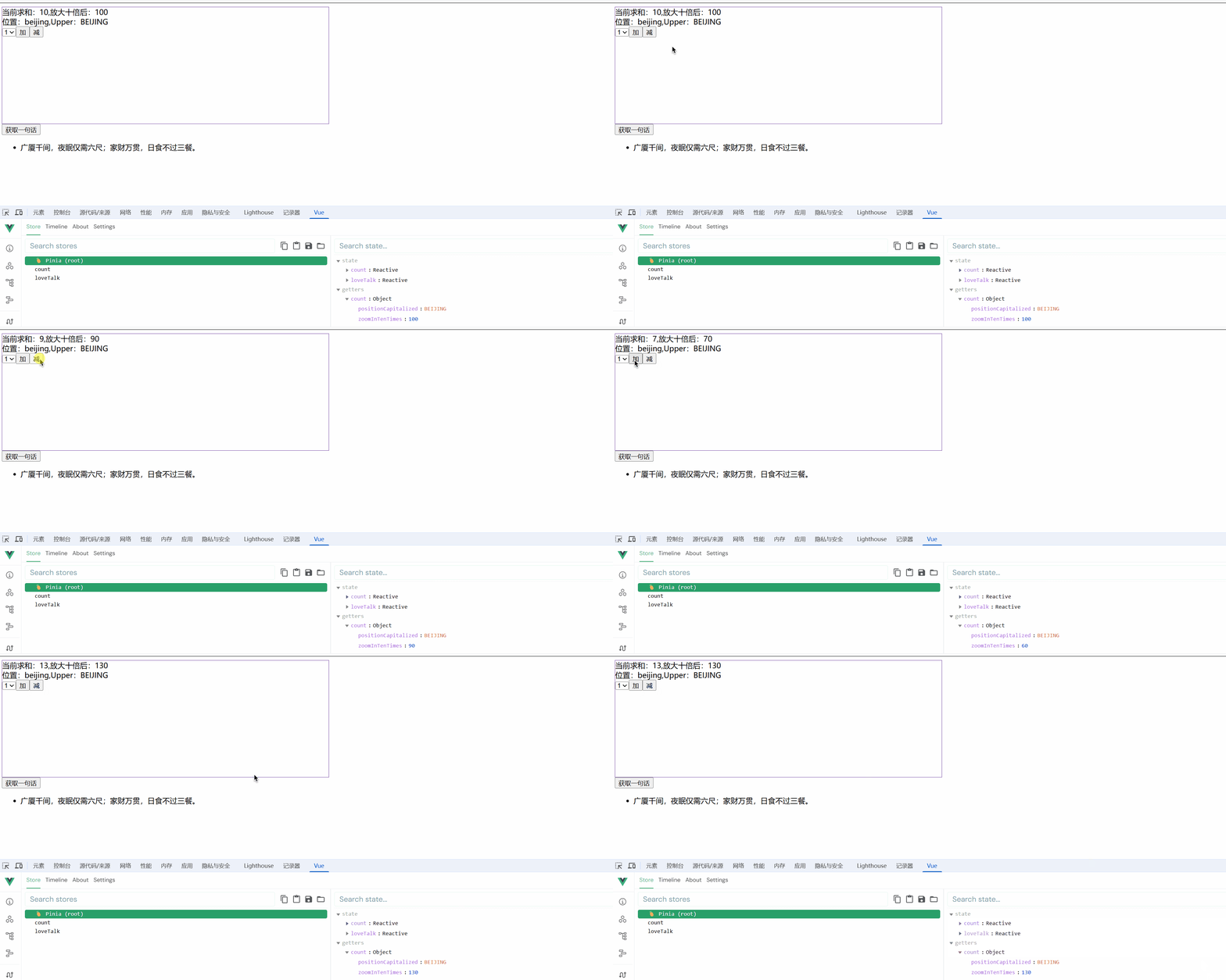
概念:当state中的数据,需要经过处理后再使用时,可以使用getters配置。
import { defineStore } from "pinia";
export const useCountStore = defineStore('count', { // 真正存储数据的地方 state() { return { sum: 10, position: 'beijing' } }, // actions里面放置的是一个一个的方法,用于响应组件中的“动作” actions: { increase(value: number) { // 修改数据(this是当前的store) this.sum += value; } }, getters: { zoomInTenTimes(state) { return state.sum * 10; }, positionCapitalized(): string { return this.position.toUpperCase(); } }});<template> <div class="outer"> <div>当前求和:{{ sum }},放大十倍后:{{ zoomInTenTimes }}</div> <div>位置:{{ position }},Upper:{{ positionCapitalized }}</div> <div> <select v-model.number="n"> <option value="1">1</option> <option value="2">2</option> <option value="3">3</option> </select> <button @click="add">加</button> <button @click="subtraction">减</button> </div> </div></template>
<script lang="ts" setup>import { ref } from "vue";import { useCountStore } from '@/store/count'import { storeToRefs } from "pinia";
defineOptions({ name: "Count",});
let countStore = useCountStore();let { sum, position, zoomInTenTimes, positionCapitalized } = storeToRefs(countStore);let n = ref(1);
const add = () => { countStore.increase(n.value);};
const subtraction = () => { sum.value -= n.value;};
</script>
<style scoped>.outer { height: 250px; width: 700px; border: 1px solid rebeccapurple;}</style>效果:
$subscribe
通过 store 的 $subscribe() 方法侦听 state 及其变化
<template> <div class="talk"> <button @click="getTalk">获取一句话</button> <div> <ul> <li v-for="word in talkList">{{ word.title }}</li> </ul> </div> </div></template>
<script lang="ts" setup>import { storeToRefs } from "pinia";import { useLoveTalkStore } from '@/store/loveTalk'
let talkListStore = useLoveTalkStore();let { talkList } = storeToRefs(talkListStore);
talkListStore.$subscribe((mutate, state) => { console.log('数据改变了'); localStorage.setItem('talkList', JSON.stringify(state.talkList));})
function getTalk() { talkListStore.getTalk();}</script>import axios from "axios";import { nanoid } from "nanoid";import { defineStore } from "pinia";
export const useLoveTalkStore = defineStore('loveTalk', { state() { return { // talkList: [{ id: "001", title: "广厦千间,夜眠仅需六尺;家财万贯,日食不过三餐。" }] talkList: JSON.parse(localStorage.getItem('talkList') as string) || [] } }, actions: { async getTalk() { let { data } = await axios.get("https://api.vvhan.com/api/ian/rand"); console.log(data); let obj = { id: nanoid(), title: data }; this.talkList.unshift(obj); } }});store组合式写法
import axios from "axios";import { nanoid } from "nanoid";import { defineStore } from "pinia";
// export const useLoveTalkStore = defineStore('loveTalk', {// state() {// return {// // talkList: [{ id: "001", title: "广厦千间,夜眠仅需六尺;家财万贯,日食不过三餐。" }]// talkList: JSON.parse(localStorage.getItem('talkList') as string)||[]// }// },// actions: {// async getTalk() {// let { data } = await axios.get("https://api.vvhan.com/api/ian/rand");// console.log(data);// let obj = { id: nanoid(), title: data };// this.talkList.unshift(obj);// }// }// });
import { reactive } from 'vue'export const useLoveTalkStore = defineStore('loveTalk', () => { let talkList = reactive(JSON.parse(localStorage.getItem('talkList') as string) || []);
const getTalk = async () => { let { data } = await axios.get("https://api.vvhan.com/api/ian/rand"); console.log(data); let obj = { id: nanoid(), title: data }; talkList.unshift(obj); }
return { talkList, getTalk }});组件通信
方式1 props
概述:props是使用频率最高的一种通信方式,常用与 :父 ↔ 子。
- 若 父传子:属性值是非函数。
- 若 子传父:属性值是函数。
<template> <div class="father"> <h3>父组件</h3> <div>{{ car }}</div> <Child :car="car" :sendToy="getToy"/> <h6>父接收到:{{ toy }}</h6> </div></template>
<script setup lang="ts" name="Father"> import { ref } from 'vue'; import Child from './Child.vue';
let car = ref('奔驰') let toy = ref('')
const getToy = (value:string)=>{ console.log(value); toy.value = value; }
</script>
<style scoped> .father{ background-color:rgb(165, 164, 164); padding: 20px; border-radius: 10px; }</style><template> <div class="child"> <h3>子组件</h3> <div>{{ toy }}</div> <h6>父给子的:{{ car }}</h6> <button @click="sendToy(toy)">给父传</button> </div></template>
<script setup lang="ts" name="Child"> import { ref } from 'vue';
let toy = ref('奥特曼') defineProps(['car','sendToy'])</script>
<style scoped> .child{ background-color: skyblue; padding: 10px; box-shadow: 0 0 10px black; border-radius: 10px; }</style>方式2 自定义事件
- 概述:自定义事件常用于:子 => 父。
- 注意区分好:原生事件、自定义事件。
- 原生事件:
- 事件名是特定的(
click、mosueenter等等) - 事件对象
$event: 是包含事件相关信息的对象(pageX、pageY、target、keyCode)
- 事件名是特定的(
- 自定义事件:
- 事件名是任意名称
- 事件对象
$event: 是调用emit时所提供的数据,可以是任意类型!!!
简单demo,组件挂载3秒后触发事件
<template> <div class="father"> <h3>父组件</h3> <!-- 给子组件Child绑定haha事件 --> <Child @haha="xyz" /> </div></template>
<script setup lang="ts" name="Father">import Child from './Child.vue'import { ref } from "vue";
function xyz() { console.log('xyz');
}
</script>
<style scoped>.father { background-color: rgb(165, 164, 164); padding: 20px; border-radius: 10px;}
.father button { margin-right: 5px;}</style><template> <div class="child"> <h3>子组件</h3> <h5>玩具:{{ toy }}</h5> </div></template>
<script setup lang="ts" name="Child">import { ref, onMounted } from "vue";let toy = ref('奥特曼')
onMounted(() => { setTimeout(() => { emit('haha'); }, 3000);})
// 声明事件let emit = defineEmits(['haha'])</script>
<style scoped>.child { margin-top: 10px; background-color: rgb(76, 209, 76); padding: 10px; box-shadow: 0 0 10px black; border-radius: 10px;}</style>点击触发
<template> <div class="father"> <h3>父组件</h3> <h5 v-show="toy">父收到子:{{ toy }}</h5> <!-- 给子组件Child绑定haha事件 --> <Child @get-toy="saveToy" /> </div></template>
<script setup lang="ts" name="Father">import Child from './Child.vue'import { ref } from "vue";
let toy = ref('')
function saveToy(value: string) { toy.value = value;}
</script>
<style scoped>.father { background-color: rgb(165, 164, 164); padding: 20px; border-radius: 10px;}
.father button { margin-right: 5px;}</style><template> <div class="child"> <h3>子组件</h3> <h5>玩具:{{ toy }}</h5> <button @click="emit('get-toy', toy)">测试</button> </div></template>
<script setup lang="ts" name="Child">import { ref, onMounted } from "vue";let toy = ref('奥特曼')
// 声明事件let emit = defineEmits(['get-toy'])</script>
<style scoped>.child { margin-top: 10px; background-color: rgb(76, 209, 76); padding: 10px; box-shadow: 0 0 10px black; border-radius: 10px;}</style>TIP在自定义事件中,vue官方推荐get-toy这种命名方式
方式3 mitt
概述:与消息订阅与发布(pubsub)功能类似,可以实现任意组件间通信。
安装mitt
npm i mitt简单demo,在utils下创建
// 引入mittimport mitt from 'mitt'
// 调用mitt得到emitter,emitter能:绑定事件、触发事件const emitter = mitt()
emitter.on('test1', () => { console.log('test1被触发了');})
emitter.on('test2', () => { console.log('test2被触发了');})
setInterval(() => { // 触发事件 emitter.emit('test1'); emitter.emit('test2');}, 1000);
setInterval(() => { // emitter.off('test1') // emitter.off('test2') emitter.all.clear(); // 全部解绑 清理事件}, 3000);
// 暴露emitterexport default emitter<template> <div class="father"> <h3>父组件</h3> <Child1/> <Child2/> </div></template>
<script setup lang="ts" name="Father"> import Child1 from './Child1.vue' import Child2 from './Child2.vue'</script>
<style scoped> .father{ background-color:rgb(165, 164, 164); padding: 20px; border-radius: 10px; } .father button{ margin-left: 5px; }</style><template> <div class="child1"> <h3>子组件1</h3> <h5>我的玩具:{{ toy }}</h5> <button @click="emitter.emit('getToy', toy)">传给他</button> </div></template>
<script setup lang="ts" name="Child1">import { ref } from 'vue'import emitter from '@/utils/emitter';
let toy = ref('奥特曼')
</script>
<style scoped>.child1 { margin-top: 50px; background-color: skyblue; padding: 10px; box-shadow: 0 0 10px black; border-radius: 10px;}
.child1 button { margin-right: 10px;}</style><template> <div class="child2"> <h3>子组件2</h3> <h5>我的电脑:{{ computer }}</h5> <h5 v-show="toy">接收到:{{ toy }}</h5> </div></template>
<script setup lang="ts" name="Child2">import { ref, onUnmounted } from 'vue'import emitter from '@/utils/emitter';let toy = ref('')
emitter.on("getToy", (value: any) => { console.log(value); toy.value = value})
let computer = ref('联想');
// 在组件卸载时解绑getToy事件onUnmounted(() => { emitter.off('getToy')})</script>
<style scoped>.child2 { margin-top: 50px; background-color: orange; padding: 10px; box-shadow: 0 0 10px black; border-radius: 10px;}</style>方式4 $attrs
-
概述:
$attrs用于实现当前组件的父组件,向当前组件的子组件通信(祖→孙)。 -
具体说明:
$attrs是一个对象,包含所有父组件传入的标签属性。注意:
$attrs会自动排除props中声明的属性(可以认为声明过的props被子组件自己“消费”了)
<template> <div class="father"> <h3>父组件</h3> <h5>{{ a }}</h5> <h5>{{ b }}</h5> <h5>{{ c }}</h5> <Child :a="a" :b="b" :c="c" :updateA="updateA"></Child> </div></template>
<script setup lang="ts" name="Father">import Child from './Child.vue'import { ref } from 'vue'
let a = ref(1);let b = ref(2);let c = ref(3);
const updateA = (value: number) => { a.value += value;}
</script>
<style scoped>.father { background-color: rgb(165, 164, 164); padding: 20px; border-radius: 10px;}</style><template> <div class="child"> <h3>子组件</h3> <GrandChild v-bind="$attrs"/> </div></template>
<script setup lang="ts" name="Child"> import GrandChild from './GrandChild.vue'</script>
<style scoped> .child{ margin-top: 20px; background-color: skyblue; padding: 20px; border-radius: 10px; box-shadow: 0 0 10px black; }</style><template> <div class="grand-child"> <h3>孙组件</h3> <h5>{{ a }}</h5> <h5>{{ b }}</h5> <h5>{{ c }}</h5> <button @click="updateA(6)">修改祖 A 值</button> </div></template>
<script setup lang="ts" name="GrandChild">
defineProps(['a', 'b', 'c', 'updateA'])</script>
<style scoped>.grand-child { margin-top: 20px; background-color: orange; padding: 20px; border-radius: 10px; box-shadow: 0 0 10px black;}</style>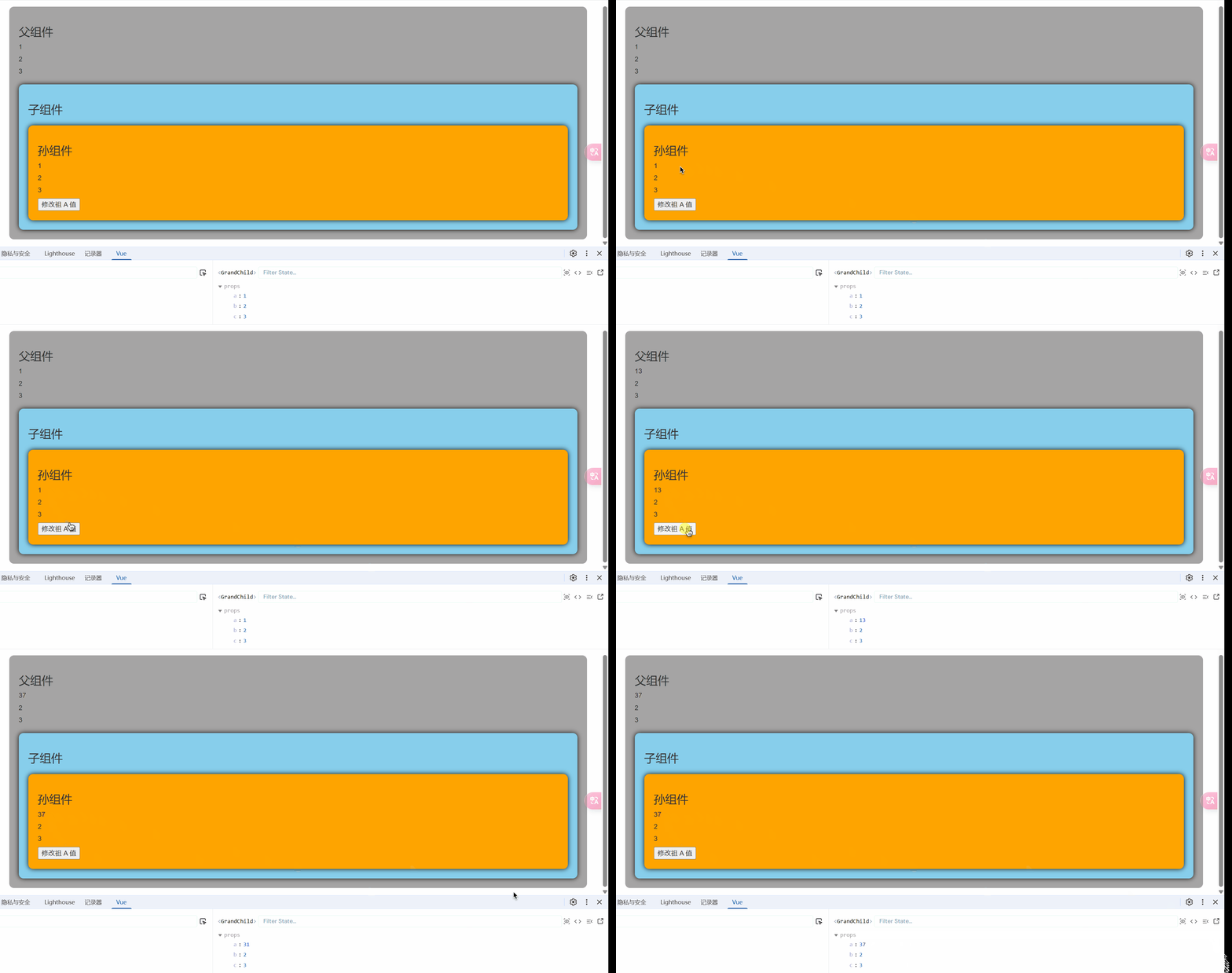
方式5 parent
-
概述:
$refs用于 :父→子。$parent用于:子→父。
-
原理如下:
属性 说明 $refs值为对象,包含所有被 ref属性标识的DOM元素或组件实例。$parent值为对象,当前组件的父组件实例对象。
<template> <div class="father"> <h3>父组件</h3> <h5>房产:{{ house }}</h5> <button @click="addBook($refs)">增加书籍</button> <Child1 ref="c1" /> <Child2 ref="c2" /> </div></template>
<script setup lang="ts" name="Father">import Child1 from './Child1.vue'import Child2 from './Child2.vue'import { ref, reactive } from "vue"
let house = ref(3)
const addBook = (refs: any) => { for (let key in refs) { refs[key].book += 3; }}
defineExpose({ house })</script>
<style scoped>.father { background-color: rgb(165, 164, 164); padding: 20px; border-radius: 10px;}
.father button { margin-bottom: 10px; margin-left: 10px;}</style><template> <div class="child1"> <h3>子组件1</h3> <h5>书籍:{{ book }}</h5> <h5>玩具:{{ toy }}</h5> <button @click="reduceProperty($parent)">房产干掉</button> </div></template>
<script setup lang="ts" name="Child1">import { ref } from "vue";let book = ref(3)let toy = ref('奥特曼')
const reduceProperty = (parent: any) => { parent.house -= 1;}
defineExpose({ book, toy })</script>
<style scoped>.child1 { margin-top: 20px; background-color: skyblue; padding: 20px; border-radius: 10px; box-shadow: 0 0 10px black;}</style><template> <div class="child2"> <h3>子组件2</h3> <h5>书籍:{{ book }}</h5> <h5>电脑:{{ computer }}</h5> </div></template>
<script setup lang="ts" name="Child2">import { ref } from 'vue';
let book = ref(6)let computer = ref('联想')
defineExpose({ book, computer })</script>
<style scoped>.child2 { margin-top: 20px; background-color: orange; padding: 20px; border-radius: 10px; box-shadow: 0 0 10px black;}</style>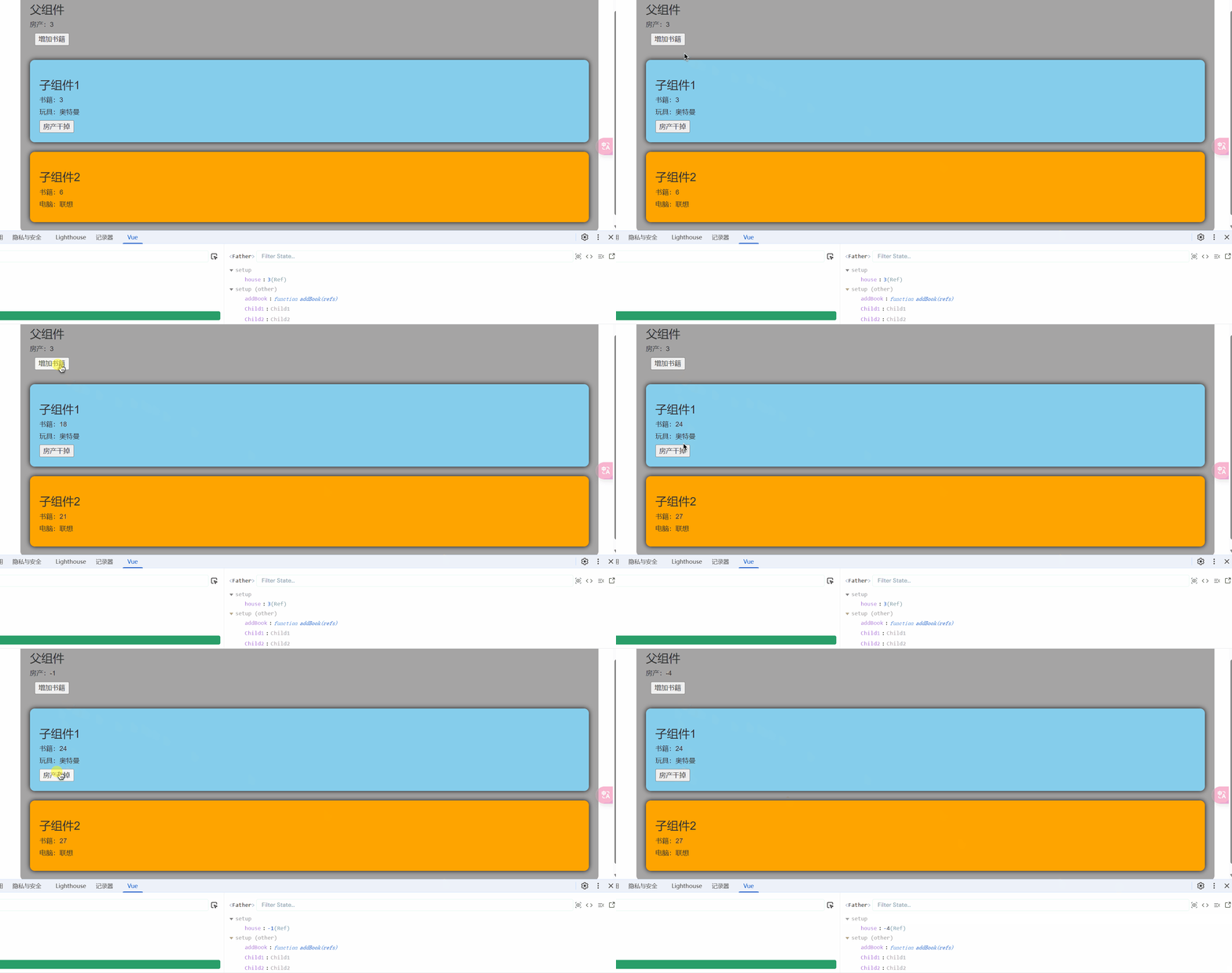
方式6 provide、inject
-
概述:实现祖孙组件直接通信
-
具体使用:
- 在祖先组件中通过
provide配置向后代组件提供数据 - 在后代组件中通过
inject配置来声明接收数据
- 在祖先组件中通过
<template> <div class="father"> <h3>父组件</h3> <h5>money:{{ money }}</h5> <h5>car:{{ car.brand }}--价格:{{ car.price }}</h5> <Child /> </div></template>
<script setup lang="ts" name="Father">import { reactive, ref, provide } from 'vue';import Child from './Child.vue'
let money = ref(100);
let car = reactive({ brand: 'BMW', price: 200})
function reduceMoney(value: number) { money.value -= value;}
// 向后代提供数据provide('moneyContext', { money, reduceMoney })provide('car', car)
</script>
<style scoped>.father { background-color: rgb(165, 164, 164); padding: 20px; border-radius: 10px;}</style><template> <div class="grand-child"> <h3>我是孙组件</h3> <h5>{{ money }}</h5> <h5>{{ y.brand }}--{{ y.price }}</h5> <button @click="reduceMoney(6)">减钱</button> </div></template>
<script setup lang="ts" name="GrandChild">import { inject } from 'vue';
let { money, reduceMoney } = inject('moneyContext', { money: 0, reduceMoney: (param: number) => { } })let y = inject('car', { brand: 'BMW', price: 0 })
</script>
<style scoped>.grand-child { background-color: orange; padding: 20px; border-radius: 10px; box-shadow: 0 0 10px black;}</style><template> <div class="child"> <h3>我是子组件</h3> <GrandChild/> </div></template>
<script setup lang="ts" name="Child"> import GrandChild from './GrandChild.vue'</script>
<style scoped> .child { margin-top: 20px; background-color: skyblue; padding: 20px; border-radius: 10px; box-shadow: 0 0 10px black; }</style>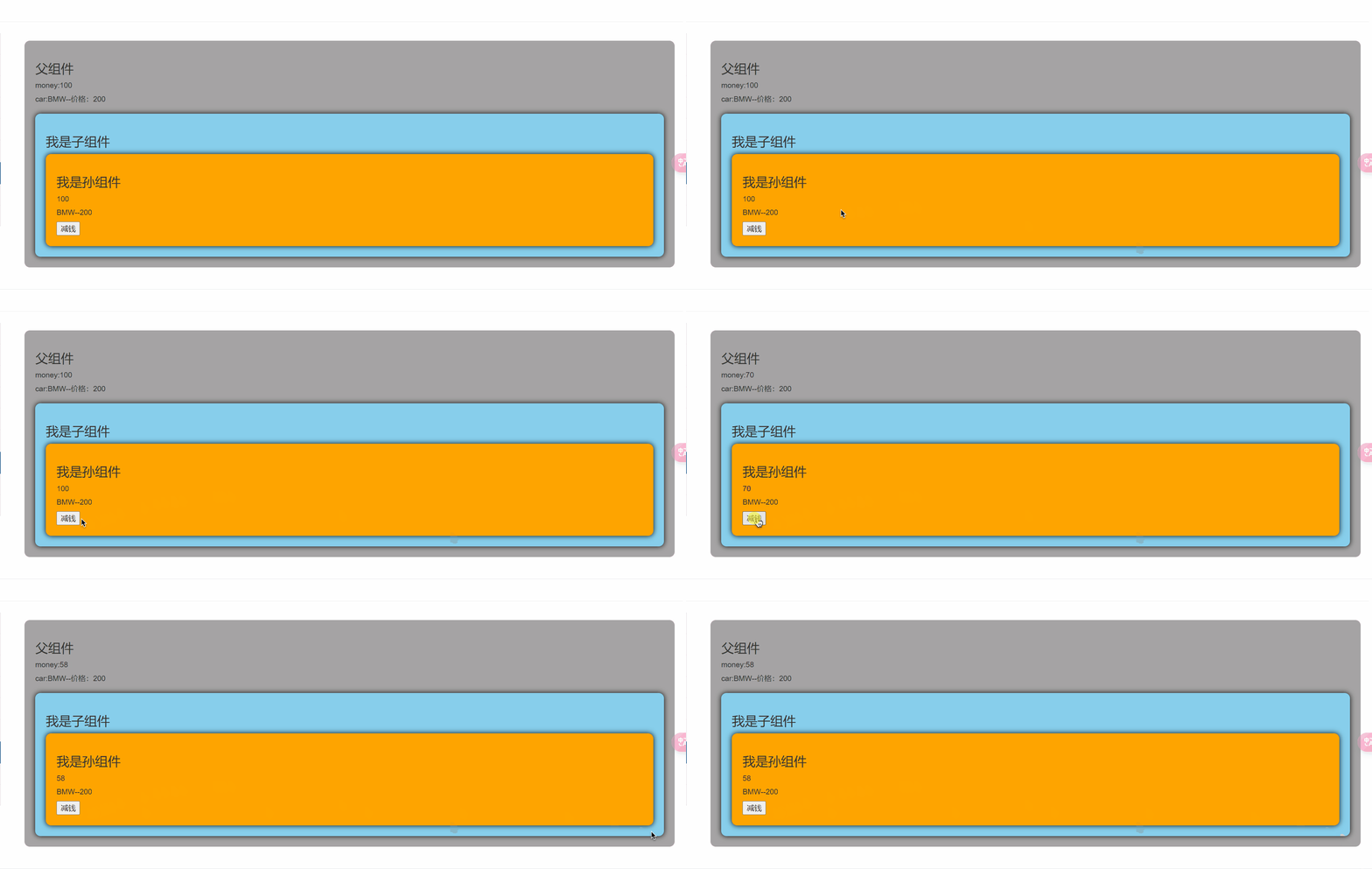
WARNING使用
provide提供数据的时候,不要.value,否则数据不是响应式的
slot
1.默认插槽
<template> <div class="father"> <h3>父组件</h3> <div class="content"> <Game title="游戏列表"> <ul> <li v-for="g in games" :key="g.id">{{ g.name }}</li> </ul> </Game> <Game title="美食城市"> <img :src="imgUrl" alt=""> </Game> <Game title="影视推荐"> <video :src="videoUrl" controls></video> </Game> </div>
</div></template>
<script setup lang="ts" name="Father">import { reactive, ref } from "vue";import Game from "./Game.vue";import { nanoid } from "nanoid";
let games = reactive([{ id: nanoid(), name: "LOL"},{ id: nanoid(), name: "王者农药"}])
let imgUrl = ref("https://th.bing.com/th/id/R.6f2c45f0e1970f362d4cb5eab87727c2?rik=y5WZ1SI%2fQsLR%2fA&riu=http%3a%2f%2fimg.daimg.com%2fuploads%2fallimg%2f190325%2f1-1Z325231625.jpg&ehk=O4I2%2bCxYfa8flgaMO4bok8%2fOAc8lDH1fs8%2fhpgKoBZ0%3d&risl=&pid=ImgRaw&r=0")let videoUrl = ref("https://cdn.pixabay.com/video/2018/04/20/15711-266043576_large.mp4")</script>
<style scoped>.father { background-color: rgb(165, 164, 164); padding: 20px; border-radius: 10px;
}
.content { display: flex; justify-content: space-evenly;}
img,video { width: 100%;}</style><template> <div class="game"> <h2>{{ title }}</h2> <slot>默认内容</slot> </div></template>
<script setup lang="ts" name="Game">import { reactive } from 'vue'
defineProps(['title'])</script>
<style scoped>.game { width: 200px; height: 300px; background-color: skyblue; border-radius: 10px; box-shadow: 0 0 10px;}
h2 { background-color: orange; text-align: center; font-size: 20px; font-weight: 800;}</style>2.具名插槽
<template> <div class="father"> <h3>父组件</h3> <div class="content"> <Game> <template v-slot:s2> <ul> <li v-for="g in games" :key="g.id">{{ g.name }}</li> </ul> </template> <template v-slot:s1> <h2>游戏列表</h2> </template> </Game>
<Game> <template v-slot:s1> <h2>美食城市</h2> </template> <template v-slot:s2> <img :src="imgUrl" alt=""> </template> </Game>
<Game> <template #s2> <video :src="videoUrl" controls></video> </template> <template #s1> <h2>影视推荐</h2> </template> </Game> </div>
</div></template>
<script setup lang="ts" name="Father">import { reactive, ref } from "vue";import Game from "./Game.vue";import { nanoid } from "nanoid";
let games = reactive([{ id: nanoid(), name: "LOL"},{ id: nanoid(), name: "王者农药"}])
let imgUrl = ref("https://th.bing.com/th/id/R.6f2c45f0e1970f362d4cb5eab87727c2?rik=y5WZ1SI%2fQsLR%2fA&riu=http%3a%2f%2fimg.daimg.com%2fuploads%2fallimg%2f190325%2f1-1Z325231625.jpg&ehk=O4I2%2bCxYfa8flgaMO4bok8%2fOAc8lDH1fs8%2fhpgKoBZ0%3d&risl=&pid=ImgRaw&r=0")let videoUrl = ref("https://cdn.pixabay.com/video/2018/04/20/15711-266043576_large.mp4")</script>
<style scoped>.father { background-color: rgb(165, 164, 164); padding: 20px; border-radius: 10px;
}
.content { display: flex; justify-content: space-evenly;}
img,video { width: 100%;}
h2 { background-color: orange; text-align: center; font-size: 20px; font-weight: 800;}</style><template> <div class="game"> <slot name="s1">默认内容</slot> <slot name="s2">默认内容</slot> </div></template>
<script setup lang="ts" name="Game"></script>
<style scoped>.game { width: 200px; height: 300px; background-color: skyblue; border-radius: 10px; box-shadow: 0 0 10px;}
h2 { background-color: orange; text-align: center; font-size: 20px; font-weight: 800;}</style>3.作用域插槽
场景:数据在子那边,但根据数据生成的结构,却由父亲决定,
<template> <div class="father"> <h3>父组件</h3> <div class="content"> <Game> <template v-slot:qwer="{ games, x }"> {{ x }} <h2>游戏列表</h2> <ul> <li v-for="g in games" :key="g.id">{{ g.name }}</li> </ul> </template> </Game>
<Game> <template #qwer="{ games }"> <h2>游戏列表</h2> <ol> <li v-for="g in games" :key="g.id">{{ g.name }}</li> </ol> </template> </Game>
<Game> <template v-slot:qwer="{ games }"> <h2>游戏列表</h2> <h4 v-for="g in games" :key="g.id">{{ g.name }}</h4> </template> </Game> </div> </div></template>
<script setup lang="ts" name="Father">import Game from "./Game.vue";</script>
<style scoped>.father { background-color: rgb(165, 164, 164); padding: 20px; border-radius: 10px;
}
.content { display: flex; justify-content: space-evenly;}
img,video { width: 100%;}
h2 { background-color: orange; text-align: center; font-size: 20px; font-weight: 800;}</style><template> <div class="game"> <slot name="qwer" :games="gameList" x="Hello">默认内容</slot> </div></template>
<script setup lang="ts" name="Game">import { nanoid } from 'nanoid';import { reactive } from 'vue';
let gameList = reactive([{ id: nanoid(), name: "LOL"},{ id: nanoid(), name: "王者农药"}])</script>
<style scoped>.game { width: 200px; height: 300px; background-color: skyblue; border-radius: 10px; box-shadow: 0 0 10px;}
h2 { background-color: orange; text-align: center; font-size: 20px; font-weight: 800;}</style>其它 API
shallowRef 与 shallowReactive
shallowRef
-
作用:创建一个响应式数据,但只对顶层属性进行响应式处理。
-
用法:
let myVar = shallowRef(initialValue); -
特点:只跟踪引用值的变化,不关心值内部的属性变化。
shallowReactive
-
作用:创建一个浅层响应式对象,只会使对象的最顶层属性变成响应式的,对象内部的嵌套属性则不会变成响应式的
-
用法:
const myObj = shallowReactive({ ... }); -
特点:对象的顶层属性是响应式的,但嵌套对象的属性不是。
总结
通过使用
shallowRef()和shallowReactive()来绕开深度响应。浅层式API创建的状态只在其顶层是响应式的,对所有深层的对象不会做任何处理,避免了对每一个内部属性做响应式所带来的性能成本,这使得属性的访问变得更快,可提升性能。
readonly 与 shallowReadonly
readonly
-
作用:用于创建一个对象的深只读副本。
-
用法:
// original可以随便改,readOnlyCopy不可修改const original = reactive({ ... });const readOnlyCopy = readonly(original); -
特点:
- 对象的所有嵌套属性都将变为只读。
- 任何尝试修改这个对象的操作都会被阻止(在开发模式下,还会在控制台中发出警告)。
-
应用场景:
- 创建不可变的状态快照。
- 保护全局状态或配置不被修改。
shallowReadonly
-
作用:与
readonly类似,但只作用于对象的顶层属性。 -
用法:
const original = reactive({ ... });const shallowReadOnlyCopy = shallowReadonly(original); -
特点:
-
只将对象的顶层属性设置为只读,对象内部的嵌套属性仍然是可变的。
-
适用于只需保护对象顶层属性的场景。
-
评论区
评论区加载中...
如果长时间无法显示,请尝试刷新页面。